


|
Xbox 360 Gamer Card App released on RIAforge.org |
||||||||
After Scotch on the Rocks in London I was struck with how many developers are also gamers. It seems there are a lot of us who build applications for people, then go home and relax in front of an Xbox 360 Console.
With that in mind I thought I would wrap up a service I have used in the past. A site, http://www.mygamercard.net/ provides a service where you can generate a graphic of your Xbox 360 account. They call this a Gamer Card, and it is available in a few different formats.
There is an example here
You can download the project here: http://gamercard.riaforge.org/


|
Red 'Resident Evil 5' Xbox 360 unveiled! |
||||||||
Engadget have just put out a press release that there is a confirmed 'red' elite 360 being released! The controller looks like the previously limited edition USA red model.
This red version is a limited edition Resident Evil 5 release.
Full article here
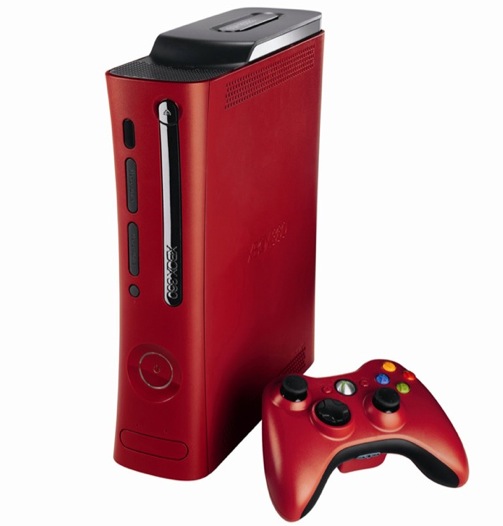
Makes me wonder if they are going to release a full green console, much like the green controllers here.
|
Consuming 360 Voices XML data feeds - 360 Voice part 2 |
||||||||
2<cfset variables.filepath = GetBaseTemplatePath()>
3<cfset variables.filepath = replace(variables.filepath, 'include.cfm', '', 'all')>
4<cfset variables.todaysfile = variables.filepath & "tmp\#DateFormat(NOW(), 'dd-mm-yyyy')#.xml">
2 <!--- Read local file --->
3 <cffile action="read" file="#variables.todaysfile#" variable="xmlfile">
4 <cfscript>
5 xmlfile = xmlparse(xmlfile);
6 </cfscript>
7<cfelse>
8 <cfhttp url="http://www.360voice.com/api/blog-getentries.asp?tag=ect0z" method="GET" charset="utf-8">
9 <cfhttpparam type="Header" name="Accept-Encoding" value="deflate;q=0">
10 <cfhttpparam type="Header" name="TE" value="deflate;q=0">
11 </cfhttp>
12 <cfscript>
13 xmlfile = xmlparse(cfhttp.filecontent);
14 </cfscript>
15 <cffile action="write" file="#variables.todaysfile#" output="#xmlfile#">
16</cfif>
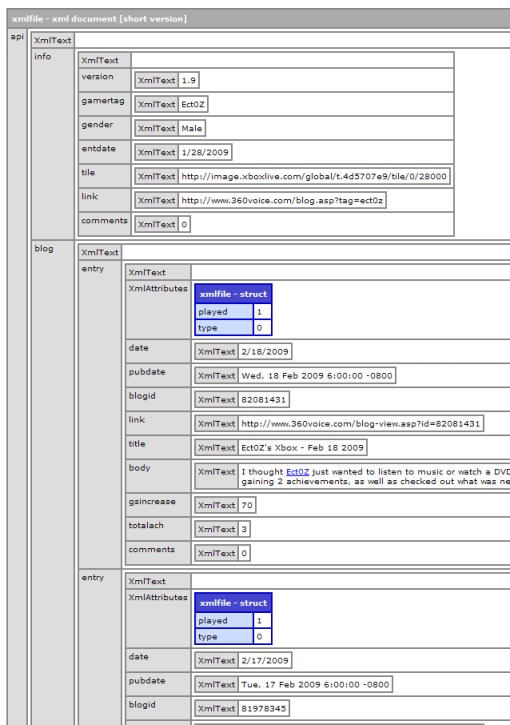 First we write out the header details from the parent node of the xml document. Create an Array, and map the contents to the child node you want. In this case the "api.info" node.
Doing this allows you to treat the previous XML object as a standard Array, so we can loop over it, and pick out the elements we want.
First we write out the header details from the parent node of the xml document. Create an Array, and map the contents to the child node you want. In this case the "api.info" node.
Doing this allows you to treat the previous XML object as a standard Array, so we can loop over it, and pick out the elements we want.
2<cfoutput>
3 <cfloop index="i" from="1" to="#ArrayLen(arrHeader)#">
4 <img src="#arrHeader[i].tile.XmlText#" alt="Gamer Icon"> - 360 Voice.com Blog
5 <!--- #arrHeader[i].link.XmlText# --->
6 </cfloop>
7</cfoutput>
2<cfoutput>
3 <cfloop index="i" from="1" to="#ArrayLen(arrEntries)#">
4 <b>#arrEntries[i].title.XmlText# -#arrEntries[i].date.XmlText#</b><br/>
5 #arrEntries[i].body.XmlText#
6 <p><br/></p>
7 </cfloop>
8</cfoutput>
|
Xbox 360 Widget from Connor Middleton - powered by 360 voice |
||||||||
After joining 360 voice a few weeks back, and wandering through their blog history I found an article about Connor Middleton, a fellow Coldfusion developer. He has created a handy Xbox 360 widget, and a generator script so that you can generate your own!
Its a flash application, so I'm guessing its flex, but when I get a free five minutes I'll generate one and see if I can figure out whats going on.

http://www.connormiddleton.com/gamercard/getYours.cfm
I think I'll have a play around an compare it to the gamer tag widgets you can generate from http://card.mygamercard.net


