


|
A birthday Falconry experience |
||||||||
This is a bit of a local post, and slightly off topic, so apologies if its not your 'thing'.
It was my wife's birthday this weekend, and one of the things she has been interested in doing was Falconry. She is quite an 'animal' person, and spending time with some more exotic birds has always been on her wish list.
I had a search around and found a local Falconry center, 'Fray Falconry services' at the Chiseldon House Hotel. ( http://www.chiseldonhousehotel.co.uk/aboutus_frayfalconry.php )
The owner Frank Hunt gave both myself and my wife a great session learning about and handling the birds he had on site. It was a real privilege to get close to, and see these great animals flying.
If you are in the area and you fancy a Falconry experience I highly recommend Fray Falconry. Frank knows his stuff, and has an infectious enthusiasm for the subject which really adds to the experience.




|
OCZ Vertex 2 SE SSD (Solid State Drive) review |
||||||||
Over the Easter weekend though I bit the bullet and ordered an OCZ Vertex 2SE 120gig Solid State Drive. This drive (http://www.scan.co.uk/products/120gb-ocz-technology-vertex-2e-25-sandforce-ssd-mlc-flash-read-285mb-s-write-275mb-s ) has reputed read speeds of 285 MB/s and write speeds of 275 MB/s.

Installation
Installation of the drive is very simple. It has standard SATA connections for data and power. The only thing to watch out for is that most of these drives are 2.5" form factor, so they may only fit in specific places in your desktop.The drive was detected in the BIOS immediately, the only setting of note here is that you are running the SATA ports in AHCI mode as this is rumoured to effect the performance of the drive. You can retrospectively enable this mode of operation for the drive after you have installed an OS, but it's a little trickier doing it this way. This article is helpful in getting AHCI working after you have already installed your OS. http://forums.pcper.com/showthread.php?t=444831
Benchmarking
Most hard drive reviews use several different industry standard software suites to benchmark drives, so I used the ATTO benchmark software (http://www.attotech.com/products/product.php?sku=Disk_Benchmark) to run read and write test on OCZ Vertex 2 SE.
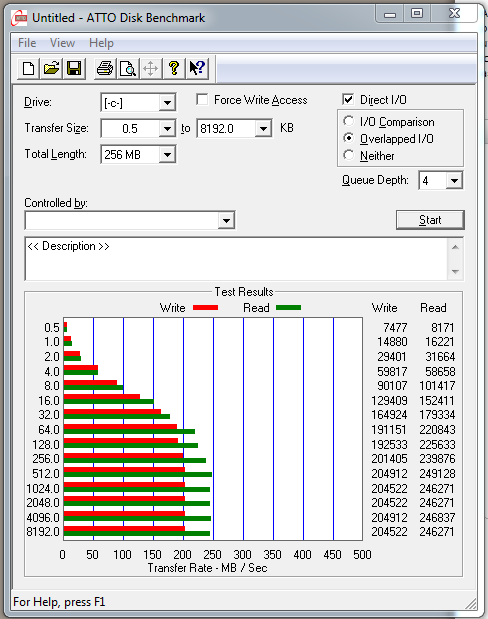
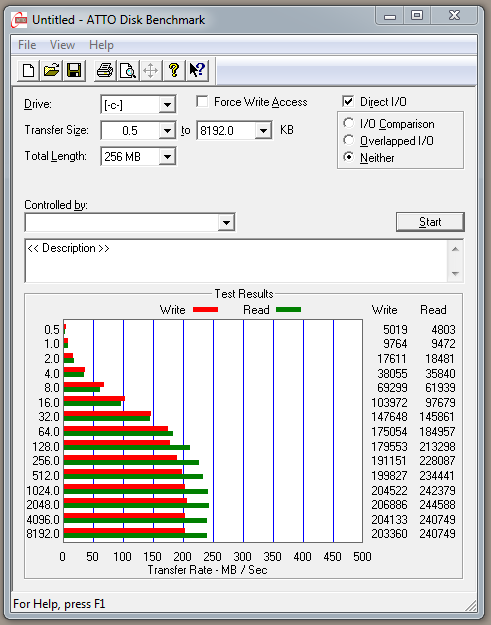
The images above show that the OCZ SSD reached speeds of just over 200 MB/s write and 250 MB/s read speeds. Not quite the advertised speeds, but I am running an old SATA chipset (nForce 4) and I am unable to use AHCI mode as the motherboard does not support it. So your chipset does matter to some degree.
None the less this shows very high read/write performance that isn't far off the advertised limits.
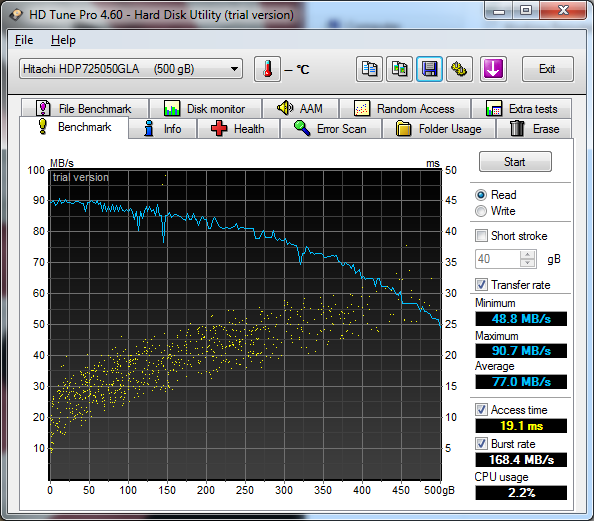
As a comparison I ran HD Tune against my existing 7200 SATA Hitachi drive, which produced the results below.
Real world
In terms of real world performance I ran a few timed events against the drive, starting with a Windows 7 install. Starting from the License entry screen it only took sixteen minutes to get to a working desktop. Similarly installing Windows 7 Service Pack 1 was an eight minute install. Even more impressive was Microsoft Office 2007, where a full install took just over four minutes.Windows 7 recognises and will accommodate SSD drives very well, but there are several good resources for checking that an SSD drive is running as it should, and that you are treating it properly. The link below are interesting reading when it comes to dealing with using SSD drives with ReadyBoost and disk Defragmenter as they can adversely effect its performance.
|
Adding custom validation rules to the JQuery Validation Plugin |
||||||||
It comes with quite a few pre defined validation methods (you can see them here: http://docs.jquery.com/Plugins/Validation#List_of_built-in_Validation_methods), but what if one of your fields requires a bespoke validation type, for example matching the first N characters of a string.
Well its pretty easy to do, you just have to plan your new rule, and programatically add it to the plugin. In the example below I am going to match the string '123456' and check it as a rule, alongside the existing rules.
I'm assuming you have already imported the JQuery library and Validation plugin. Next we use the addMethod() function of the Validation plugin to add a new custom method. This accepts a few different arguments, as detailed below:
Name (String)
The name of the method, used to identify and referencing it, must be a valid javascript identifier
Method (Callback)
The actual method implementation, returning true if an element is valid. First argument: Current value. Second argument: Validated element. Third argument: Parameters.
Message (string / function)
The default message to display for this method. Can be a function created by jQuery.validator.format(value). When undefined, an already existing message is used (handy for localization), otherwise the field-specific messages have to be defined.
As an example I have created a new rule called 'pattern-match', this rule will check if the passed in element is required 'this.optional(element)' OR if the first six characters match the designated pattern, in this case '123456'.
2$(document).ready(function(){
3
4$.validator.addMethod("pattern-match", function(value, element) {
5
6return this.optional(element) || (value.substr(0,6) == '123456');
7
8}, "* match the string");
9
10});
11</script>
This code creates the new validation method, now we can reference it in our validate() method just like all the pre existing methods.
2$(document).ready(function(){
3
4$("#form").validate({
5
6errorContainer: "#error",
7errorLabelContainer: "#error ul",
8wrapper: "li",
9
10rules: {
11numberField: {
12
13required: true,
14pattern-match: true,
15minlength: 8,
16maxlength: 10 }
17 },
18
19messages: {
20
21numberField: {
22
23required: "Please enter a number",
24pattern-match: "Number does not match 123456",
25minlength: "Number must be at least 8 characters long",
26maxlength: "Number cannot be more than 10 characters long"
27}
28
29 }
30});
31
32});
33</script>
Just add it in with the other methods, and specify the the error message that goes with it.
The addMethod() function will take any form of custom validation that you can write in standard JavaScript, so it should be possible to accommodate any bizarre rules you might want to come up with.
|
Using URL re-writing to provide friendly 404 error screens |
||||||||
The problem I've had setting up a global 404 handler is that I can setup a front end friendly error page easily enough, but the method used to set it up hugely affects my ability to actually report what the error was.
For example in the Linux admin area I can specify a path to a 404 template, but this appears to actually relocate the user to the file specified, leaving any error and its associated information behind.
Similarly the 'onMissingTemplate' Application.cfc function only fires when a missing ColdFusion template is requested. Not just any old url that someone tries on my site.
What I eventually ended out with is a URL rewrite rule that catches any page request that does not match an already defined re-write rule.
So if a user asks for 'www.mysite.com/contact/' the following rule would be found and used:
But if they asked for any non matched rule, for example 'www.mysite.com/contactx/', or 'www.mysite.com/hack-attempt/' then the following rules would kick in and divert the user:
2RewriteRule ^([^/.]+)/$ index.cfm?go=error&error=$1
3RewriteRule ^([^/.]+)$ index.cfm?go=error&error=$1
The rule above just sends a user to my error page. It also appends the string matched in the Regular Expression to the end of the URL (error=$1).
This is so I can pick it up in a ColdFusion variable scope and log it, to actually let me know what the error was.
There is another documented way of using URL re-writing to redirect users to custom error pages. You can use custom error pages for any error type as long as you know its number by adding the following to your re-write file:
As an example if I had the file 'error.htm' in the root directory of my site and I wanted to use it for a 404 error I would use:
Some of the more common server error responses are:
2400 - Bad request
3403 - Forbidden
4404 - Wrong page
5500 - Internal Server Error


