


|
A simple Fusebox reset function |
||||||||
A simple Fusebox reset function
I am always forgetting the application URL for resetting fusebox frameworks, so instead of having to type out the entire fuseaction url, and appending the load variables, and the parsing variables you can create a fuse action for it.
2 <cfargument name="myFusebox" />
3 <cfargument name="event" />
4
5 <cfset xfa.reinit = "index.cfm?" & FUSEBOX_PARAMETERS.fuseactionVariable & "=" & "&fusebox.loadclean=true&fusebox.parseall=false&fusebox.execute=true&fusebox.password=" & FUSEBOX_PARAMETERS.password>
6 <cflocation url="#xfa.reinit#" addtoken="false">
7 </cffunction>
The code above will build the URL using the fuse action variable (IE 'action=' or whatever you have specified). It also uses the fusebox password set in your Application.cfc.
There may be a small security risk involved with this, so don't use an obvious name for the function. Also they would need your fusebox password.
Even then thought the only potential issue I can see with this is that someone may empty your framework cache and rebuild your application. Which isn't all that bad?


|
Changing a table row colour with JavaScript |
||||||||
I was recently looking at a way of people selecting many records from a data display. You know the usual table layout of data, populated with a query object. I decided on a column of checkboxes so that a user could select multiple records. The only issue with this was that it is not the most visible indicator of whether a record is selected.
So I thought I would add a JavaScript function to change the table row background colour, to show selected records.
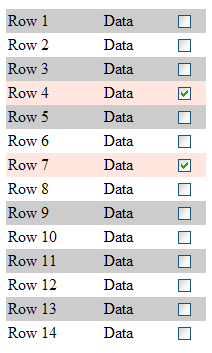
Firstly here is a simple mock up of a table, populated with a list.
2<cfparam name="variables.odd" default="">
3
4<cfoutput>
5<table width="200" border="0" cellspacing="0" cellpadding="2">
6<cfloop list="#variables.myList#" index="variables.row">
7 <cfif (variables.row MOD 2) IS 1>
8 <cfset variables.odd = true>
9 </cfif>
10 <tr <cfif variables.odd> bgcolor="CCCCCC" </cfif> >
11 <td>Row #variables.row#</td>
12 <td>Data 2</td>
13 <td align="middle"><input type="checkbox" id="rowId" name="rowId" value="#variables.row#" onclick="row_color(this,#variables.odd#)"></td>
14 </tr>
15 <cfset variables.odd = false>
16</cfloop>
17</table>
18</cfoutput>
The table rows are alternately coloured based on a basic odd/even check. This value is also passed to the function, as if we uncheck the record we want the row to return to its original colour.
Next we have the JavaScript function that each checkbox is running when it is clicked. The 'row_color' function uses the 'this' variable to work back up two elements using the 'parentNode' function. This targets the table row (tr) tag, and changes its colour to whichever value is set at the top of the script. There are two colour off values as the table rows are alternately coloured, and we want them to return to their original colour when unselected.
2 var color_on = '#FFE7DF';
3 var color_off_1 = '#CCCCCC';
4 var color_off_2 = '#FFFFFF';
5
6 function row_color(pTarget,row)
7 {
8 var pTR = pTarget.parentNode.parentNode;
9
10 if(pTR.nodeName.toLowerCase() != 'tr')
11 {
12 return;
13 }
14
15 if(pTarget.checked == true)
16 {
17 pTR.style.backgroundColor = color_on;
18 }
19 else
20 {
21 if(row == 1)
22 {
23 pTR.style.backgroundColor = color_off_1;
24 }
25 else
26 {
27 pTR.style.backgroundColor = color_off_2;
28 }
29
30 }
31 }
32</scr/ipt>
|
Incorrect error message reporting using CFFile action rename |
||||||||
During a batch process that I was writing recently I was using a CFfile operation to rename some files.
When running it I came across this error message:
2The value of the attribute source, which is currently "C:\fullUrl.jpg", is invalid.
This is the calling cfml code. The actual variable values aren't important.
So I checked and doubled check the source url, and manually browsed to the directory and viewed it. The file was right there! I had a wander around online and found that this isn't a new issue, but more a bad error report.
The error isn't actually relating to the 'source' attribute at all, but rather the 'destination' attribute. In this case it was a file/folder permissions problem. (I didn't have write access). It was simply a case of Coldfusion server reporting it incorrectly.
|
My friend has launched his Photography site |
||||||||
I've got a Coldfusion developer (part time photographer) friend who has just finished his photography site. It's up now at http://www.tonybaileyphotography.com/.
He's also been invited to provide a photo for the site http://www.todaysphoto.org. It is a night shot of the Bridge over the Severn Estuary,crossing from England to wales.You can view it here.
Also serves as a remind to me that I need to get out with my Canon more!


