


|
Consuming 360 Voices XML data feeds - 360 Voice part 2 |
||||||||
2<cfset variables.filepath = GetBaseTemplatePath()>
3<cfset variables.filepath = replace(variables.filepath, 'include.cfm', '', 'all')>
4<cfset variables.todaysfile = variables.filepath & "tmp\#DateFormat(NOW(), 'dd-mm-yyyy')#.xml">
2 <!--- Read local file --->
3 <cffile action="read" file="#variables.todaysfile#" variable="xmlfile">
4 <cfscript>
5 xmlfile = xmlparse(xmlfile);
6 </cfscript>
7<cfelse>
8 <cfhttp url="http://www.360voice.com/api/blog-getentries.asp?tag=ect0z" method="GET" charset="utf-8">
9 <cfhttpparam type="Header" name="Accept-Encoding" value="deflate;q=0">
10 <cfhttpparam type="Header" name="TE" value="deflate;q=0">
11 </cfhttp>
12 <cfscript>
13 xmlfile = xmlparse(cfhttp.filecontent);
14 </cfscript>
15 <cffile action="write" file="#variables.todaysfile#" output="#xmlfile#">
16</cfif>
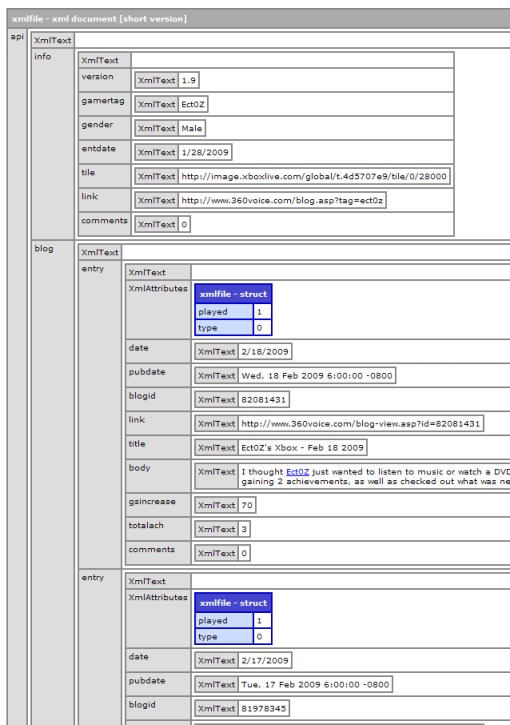 First we write out the header details from the parent node of the xml document. Create an Array, and map the contents to the child node you want. In this case the "api.info" node.
Doing this allows you to treat the previous XML object as a standard Array, so we can loop over it, and pick out the elements we want.
First we write out the header details from the parent node of the xml document. Create an Array, and map the contents to the child node you want. In this case the "api.info" node.
Doing this allows you to treat the previous XML object as a standard Array, so we can loop over it, and pick out the elements we want.
2<cfoutput>
3 <cfloop index="i" from="1" to="#ArrayLen(arrHeader)#">
4 <img src="#arrHeader[i].tile.XmlText#" alt="Gamer Icon"> - 360 Voice.com Blog
5 <!--- #arrHeader[i].link.XmlText# --->
6 </cfloop>
7</cfoutput>
2<cfoutput>
3 <cfloop index="i" from="1" to="#ArrayLen(arrEntries)#">
4 <b>#arrEntries[i].title.XmlText# -#arrEntries[i].date.XmlText#</b><br/>
5 #arrEntries[i].body.XmlText#
6 <p><br/></p>
7 </cfloop>
8</cfoutput>


|
"The Register" highlights software convergence security issues |
||||||||
The Register news site has just released an important article (Google gears hack attack) that highlights a modern danger with software development. Previously it was quite clear cut as to the platform of your application, IE is it a desktop app, or a web app, or a citrix client app etc. But with the convergence of several modern technologies such as Adobe's AIR and Google's GEARS some of the previous boundaries are becoming blurred.
No longer is an application a single, gateway specific, platform bound instance. As architects we must now encompass new potential security issues that were previously reserved for differing platforms. With the migration of applications across multiple platforms and previous technology boundaries this is something we must all keep in the forefront of software development.
I know I will during the planning phases of my next AIR app.
|
Reading a file using a Java object |
||||||||
Sometimes in Coldfusion development its handy to use coldfusions standard functions such as CFfile or CFdirectory. But you can also invoke the underlying Java objects that share similar functionality. These can often be more efficient too, as there is no coldfusion server compilation layer involved.
For one piece of work I had recently I was reading a series of files, parsing them out and inserting a the collection of records into a database.
So I created used a java file reader object to read the files.
There is the odd extra config line in here, as the server pathing is unix based not windows based, and I'm dynamically reading the files from the directory.
2<cfset variables.replaceVar = listlast(variables.dir, '\')>
3<cfset variables.dir = replaceNoCase(variables.dir, variables.replaceVar,'', 'all')>
4<cfset variables.filename = variables.dir & "datafile#url.fileNo#.txt">
Next I use the file name variable in the java FileReader object call. I wrap the file reader in a BufferedReader object as this greatly reduces the operation overhead of the FileReader object as the data is buffered into memory and not read from the disk.
Next I'll loop over the outptut string from the buffered file reader object, parsing each line and invoking the cfc method of 'processContent', passing in the string (line of data) as the argument 'content'. '
2 cnt = 0;
3 srcFile = variables.filename;
4
5 // create a FileReader object
6 fr = createObject("java","java.io.FileReader");
7 fr.init(srcFile);
8
9 // create a BufferedReader object
10 br = createObject("java","java.io.BufferedReader");
11 br.init(fr);
12 str = br.readLine();
13
14 // writeOutput(str);
15 while isDefinedd("str")) {
16 cnt = cnt + 1;
17 str = br.readLine();
18 if(isDefined("str")){
19 //writeOutput(cnt);
20 //writeOutput(str);
21 // pass to CF to do the rest
22 processContent(str);
23 }
24 }
25 br.close();
26 //writeOutput(cnt);
27 </cfscript>
Now you can perform any sort of parsing you want to perform on the content. In the example below I am creating a local structure and populating it with each delimited value. This allows me to use standard notation to pick out individual elements for whatever processing you want.
2 <cfargument name="content" type="string">
3
4 <cfset var local = structnew()>
5
6 <cfset local.today = now()>
7
8 <cfset local.filecontent = replace(arguments.content,'\n',"", "all" )>
9
10 <!--- list to array based on tab --->
11 <cfset local.data = local.filecontent.split("\t")>
12 <cfset local.variableName1 = local.data[1]>
13 <cfset local.variableName2 = local.data[2]>
14
15 Etc...
16
17 </cffunction>
|
Creating an MS Dos style text file directory listing - invoked with cfexecute |
||||||||
I have had a need in the past to list directory contents, and filter on the extension type within that directory.
You can do this using cfdirectory, but you can also use cfexecute to run a batch file, which in my experience is a quicker solution than having coldfusion reading large directories.
Create a batch file like this:
"\yourdir\*.*" is optional you can filter this by file type by adding a file extension. EG \ or \*.log or \logs\*.*
"dir.txt" is the filename you want the listing to be stored in, choice of name/location is up to you. You can write it out to any directory that the server has permissions on.
eg mylogs.dat or \mylogs\list.txt


