


|
Xbox 360 Widget from Connor Middleton - powered by 360 voice |
||||||||
After joining 360 voice a few weeks back, and wandering through their blog history I found an article about Connor Middleton, a fellow Coldfusion developer. He has created a handy Xbox 360 widget, and a generator script so that you can generate your own!
Its a flash application, so I'm guessing its flex, but when I get a free five minutes I'll generate one and see if I can figure out whats going on.

http://www.connormiddleton.com/gamercard/getYours.cfm
I think I'll have a play around an compare it to the gamer tag widgets you can generate from http://card.mygamercard.net


|
CfHttp compression responses when calling a url - 360 Voice part 1 |
||||||||
I was recently writing a service to consume an xml feed, and I stumbled upon an issue that I had previously not seen with the cfhttp tag. These days I would usually opt for a cfc call to a webservice, and consume it as a 'true' service object, but this is an old school http request, as I am reading asp page content. I setup the standard cfhttp code in coldfusion.
Unfortunately the http response was "Connection Failure". After investigating various potential authentication issues from both the destination server and the source server I had hit a wall. I fired up 'HTTP debugger' and had a scan of the http responses to see if anything stood out, and discovered that the http response was actually '200' which signifies everything is ok. So I was actually receiving a valid response. Maybe the problem was coldfusion. It transpires that if CF receives compressed or encrypted http responses you have to tell it what to do with them manually.
2<cfhttpparam type="Header" name="TE" value="deflate;q=0">
By adding these headers to the cfhttp you are requesting that the server return uncompressed responses, allowing coldfusion to handle the data returned. I ended out piecing this together from several different sources, but this site (http://www.talkingtree.com/blog/index.cfm/2004/7/28/20040729) has a very good blog entry on this as well. So thanks Steven Erat, you helped a ton there!
Complete code:
2<cfhttpparam type="Header" name="Accept-Encoding" value="deflate;q=0">
3<cfhttpparam type="Header" name="TE" value="deflate;q=0">
4</cfhttp>
Now on to why I was actually writing this cfhttp request in the first place, http://www.360voice.com/, where you can hook up your XBox 360 to a web data feed.
|
Internet Explorer 7 and -ms-interpolation-mode css |
||||||||
Whilst working on a recent project I was looking at how IE 7 renders images that have been incorrectly sized in code. There is a css style "-ms-interpolation-mode" that handles stretched images in IE 7.
The msInterpolationMode property works with stretched images only. As an example if the dimensions of an image are 200x200 but the developer has specified height and width of 400x400, then the image will be stretched to the new dimensions using the nearest-neighbor algorithm, unless you override it with this property.

Notice the difference in the overstretched images above?
This can be achieved by adding this code to your style sheets:
2img.high { -ms-interpolation-mode:bicubic }
3img.nearest { -ms-interpolation-mode:nearest-neighbor }
4</style>
Note that Firefox handles this automatically.
|
Tomb raider for a tonne? |
||||||||
I noticed this the other day on ebay, seems a bit ambitious if you ask me!
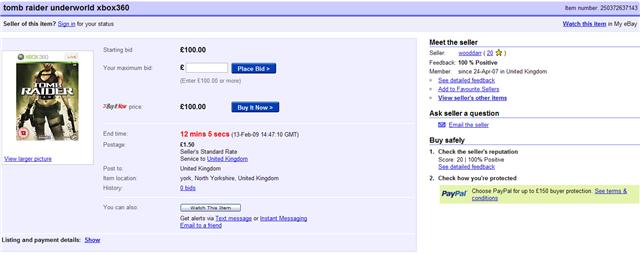
I suppose there is no harm in trying! Althought its only £20.00 on the highstreet......


