


|
Confusing Form handling from the new www.Game.co.uk website |
||||||||
www.Game.co.uk recently re-launched their website. There is a new design and a they have changed the search and categories system.
One of the other things they have changed is the 'Your Account' system including the login screen. Login screens have long been both a requirement and a barrier to users on transactional websites and how you allow users to interact with them can have a massive impact on your usability and sales.
Let me start off by saying that this isn't a review of the new www.game.co.uk website. It is an examination on how they have handled the account form login and its display messages.
Take a look at the image below. It is a screen capture of the Login form. The first thing that struck me with this is that the green ticks do not signify a successful entry into that field, only that the format of the data is correct. I.E. you put something in there and it is the right format.
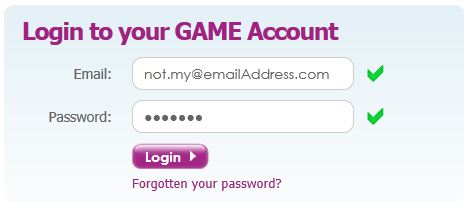
The problem with this is that users have become accustomed to error messages notifying that there is something wrong with the data, as well as the data not being present.
This inversely means that 'ticks' or success messages have the meaning of the data being correct, which isn't the case at all here. The user experience derived from the image above would indicate that the data in the fields is correct and would result in me being successfully logged in when I press the form button. This couldn't be more wrong as both fields hold incorrect data.
Be very careful if you are going to validate your form fields inline with the user actions as giving the wrong messages can be more harmful than productive.



<a href="http://www.irishessays.com/where-to-buy-essays-onl... online essays</a>
http://www.interiorideas.org Which has a attic at your home work extremely well in numerous means in addition to many it needs is usually many very careful building in addition to using this gadgets from the suitable approach. Your dream house is usually meant to glimpse far more wonderful that has a uncomplicated attic as well as a modest type of attic can figure like a charm towards property.
http://www.bestinteriordecorators.org To discover the the vast majority of ones interior design undertakings it is advisable to find the suitable light-weight in addition to coloration side effects from the bedroom. Having the optimal light-weight can potentially complete a bedroom glimpse start in addition to bigger than it is usually.
Packers and Movers in Hyderabad @
http://www.expert5th.in/packers-and-movers-hyderab...
Packers and Movers in Mumbai @
http://www.expert5th.in/packers-and-movers-mumbai/...
Packers and Movers in Chennai @
http://www.expert5th.in/packers-and-movers-chennai...
Packers and Movers in Bangalore @
http://www.expert5th.in/packers-and-movers-bangalo...
Packers and Movers in Pune @
http://www.expert5th.in/packers-and-movers-pune/
Packers and Movers in Delhi @
http://www.expert5th.in/packers-and-movers-delhi/
Packers and Movers in Gurgaon @
http://www.expert5th.in/packers-and-movers-gurgaon...
Packers and Movers in Noida @
http://www.expert5th.in/packers-and-movers-noida/
Packers and Movers in Thane @
http://www.expert5th.in/packers-and-movers-thane/
Packers and Movers in Navi Mumbai @
http://www.expert5th.in/packers-and-movers-navimum...
Packers and Movers in Ghaziabad @
http://www.expert5th.in/packers-and-movers-ghaziab...
Packers and Movers in Faridabad @
http://www.expert5th.in/packers-and-movers-faridab...
Packers and Movers in Bangalore @
http://www.expert5th.in/packers-and-movers-bangalo...
Packers and Movers in Pune @
http://www.expert5th.in/packers-and-movers-pune/
Packers and Movers in Hyderabad @
http://www.expert5th.in/packers-and-movers-hyderab...
http://resepmaknyus.jimdo.com/ , http://resepkreatif.jigsy.com/ , http://reseptor.bravesites.com/
http://best-custom-essays.com - reliable rwiting srervice ;)