Shaun Mccran

My digital playground
 
05
M
A
R
2010

Returning values from mySQL in a select query as Yes/No rather than 1/0

Whilst writing a ColdFusion based query to create a JSON response I thought I'd look up returning data values as a "Yes/No" string rather than "1/0". Then I wouldn't have to transform it in any way to use in the JSON build script.

The mySQL version allows you to do this by evaluating the value, and matching a string if the condition is met, like this:

view plain print about
1SQL version:
2SELECT intid,varuserfname,varusersname, IF(intactive<>0, "Yes", "No")
3FROM     table.users

This does not work in ColdFusion at all. An error is thrown:
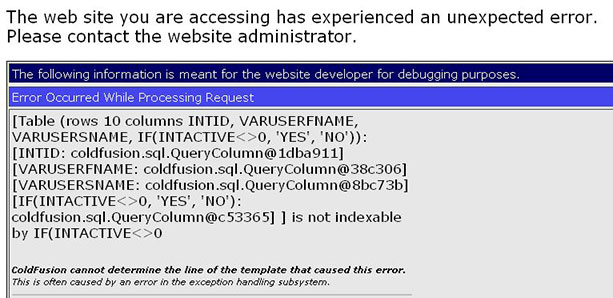
After a little tweaking it seems that if you alias the field it does work. In the example code below I've simply aliased the field with its own name.

I'm not exactly clear why, as the error message above isn't all that helpful.

view plain print about
1CF version:
2SELECT intid,varuserfname,varusersname, IF(intactive<>0, 'Yes', 'No') as intactive
3FROM     table.users

 
15
F
E
B
2010

Emulating the mySql limit function in MS SQL

There are pro's and con's to both mySql and MS SQL, one of the pro's of mySql is the limit function. This allows you to set a starting record number, and select N number of records from there. But how can we do that in MS SQL?

This is usually used for pagination functions, IE SELECT the next N records from the current count.

Firstly declare two variables, a "rows per page" and a start record.

view plain print about
1<cfset startpos = 10>
2<cfset rowsperpage = 15>
3
4DECLARE @rowsperpage INT
5
6 DECLARE @start INT
7
8 SET @start = #startpos#
9 SET @rowsperpage = #rows#

Next we need to write the query we want, but wrap it in a parent select. Remember at this point to do all your conditional processing on the query inside the parenthesis.

view plain print about
1SELECT * FROM
2
3 (SELECT row_number() OVER (ORDER BY [intId]) AS rownum, *
4
5 FROM [table]
6 Where [table].intId = <cfqueryparam cfsqltype="cf_sql_integer" value="#arguments.intId#">) AS tempQuery

Next we can apply a where clause that filters down the results based on the two variables declared at the top of the script. This means we will only get back the required number of records, starting at our defined record number.

view plain print about
1Where tempQuery.rownum BETWEEN (@start) AND (@start + @rowsperpage)
2Order by rownum

The whole script looks like this:

view plain print about
1<cfset startpos = 10>
2<cfset rowsperpage = 15>
3
4DECLARE @rowsperpage INT
5
6 DECLARE @start INT
7
8 SET @start = #startpos#
9 SET @rowsperpage = #rows#
10
11SELECT * FROM
12
13 (SELECT row_number() OVER (ORDER BY [intId]) AS rownum, *
14
15 FROM [table]
16 Where [table].intId = <cfqueryparam cfsqltype="cf_sql_integer" value="#arguments.intId#">) AS tempQuery
17
18Where tempQuery.rownum BETWEEN (@start) AND (@start + @rowsperpage)
19Order by rownum

I am selecting *, but I recommend that you actually list your fields here, I tweaked it for this entry.

Not quite as nice as the mySql version tho is it:

view plain print about
1Select *
2From table
3Limit 0,100

 
12
O
C
T
2009

Quotes being changed to question marks using cfsavecontent and MySql

One of the tables in an online application stores entire html templates in a blob field, this data is pulled out and used to build emails, replacing specific keywords.

I recently needed to update some of this data, but there is not an administration system for it, so a manual SQL script would have to do.

The problem I encountered was that creating a html template as a variable using cfsavecontent and inserting it into MySql was causing all the ' to appear as ?. I read a blog entry based on Coldfusion MX and setting the character encoding in your coldfusion administrator, for each datasource. Or you could do it in the template, like this:

view plain print about
1<cfprocessingdirective pageencoding="iso-8859-1">
2<cfcontent type="text/html; charset=iso-8859-1">

This didn't seem to work at all, in fact I found that it would error whilst trying to insert the cfsavecontent variable using cfqueryparam. There seemed to be some sort of encoding issue between the two tags.

view plain print about
1<cfsavecontent variable="htmlContent">
2Html template code
3<body> etc </body>
4</cfsavecontent>
5<cfquery datasource="#application.dsn#">
6INSERT INTO table (fields)
7VALUES ('#htmlContent#');
8</cfquery>

This didn't work either with Cfqueryparam, or as a non param input. It turns out that you simply need to escape the characters (double them, or use character representations). IE don't use a single quote, use two . In this way the MySql encoding treats the character as a character, rather than a potential command. I still think that this is something that can be fixed by setting the encoding type, but in this case there was a far simpler solution.

 
26
A
U
G
2009

Example of inserting a Struct() into a database using keys

A while ago a colleague and I were working on a timesheet application in Flex. The idea was that you could commit a custom timebar object, generated in flex, and it would update the dataset in the back end using the ColdFusion flex gateway.

I came across the code recently, and decided to tidy it up a bit, and make the query dynamic, based on the Struct contents. The obvious limitation to this is that your Struct and your database schema have to match exactly.

I won't go into the Flex application here, but I've emulated its input arguments here with a pre-populated structure.

view plain print about
1<cfscript>
2 timesheetTask = StructNew();
3 StructInsert(timesheetTask, "employeeid", '36');
4 StructInsert(timesheetTask, "timesheetDT", '0');
5 StructInsert(timesheetTask, "projectid", '6');
6 StructInsert(timesheetTask, "weekid", '25');
7 StructInsert(timesheetTask, "taskid", '39');
8 StructInsert(timesheetTask, "hours", '8');
9 StructInsert(timesheetTask, "comment", 'Comments for this task live here');
10 StructInsert(timesheetTask, "szStatus", '1');
11 StructInsert(timesheetTask, "iFirstLineApproval", '23');
12 StructInsert(timesheetTask, "iSecondLineApproval", '34');
13 StructInsert(timesheetTask, "iCurrentApprover", '');
14 StructInsert(timesheetTask, "szRejectReason", '');
15 StructInsert(timesheetTask, "szDescription", '');
16
17 updateTimesheet = createObject("component", "timesheet");
18 updateTimesheet.updateTask(timesheetTask);
19
</cfscript>

Notice that this code also calls the CFC object at the end. The data itself isn't massively important, it's a time object for recording tasks.

Next we have the function, which accepts a Struct() argument called 'taskStruct'. I then loop through the structure, and populate a SQL query using the keys from a collection. The only logic is a check to see if it is the last structure element, as this controls the ',' placement.

view plain print about
1<cffunction name="updateTask" access="remote" returntype="string" hint="Creates a record for timesheet tasks">
2 <cfargument name="taskStruct" type="struct" required="yes">
3 <cfset var count = 0>
4
5 <cfdump var="#arguments.taskStruct#">
6 <cfset variables.structSize = structCount(arguments.taskStruct)>
7
8 <cfquery datasource="#application.dsn#">
9 INSERT INTO [dbo].[timesheet]
10 (<cfloop collection="#arguments.taskStruct#" item="key">
11 [#key#]
12 <cfset count = count + 1>
13 <cfif count LT variables.structSize>,</cfif>
14 </cfloop>)
15
16 <cfset count = 0>
17
18 VALUES(<cfloop collection="#arguments.taskStruct#" item="key">
19 '#arguments.taskStruct[key]#'
20 <cfset count = count + 1>
21 <cfif count LT variables.structSize>,</cfif>
22 </cfloop>)
23 </cfquery>
24
25 <cfreturn true>
26 </cffunction>

That will insert your Struct into a database, in small and tidy manner. It was somewhere around here that we started using cfproperty tags, and creating strongly typed objects for Flex.

 
13
A
U
G
2009

Importing large datasets into MySQL - Packet too large errors

I was recently migrating some data from one application to another and came across a stumbling block in MySQL. If you are trying to run a large SQL file backup restoration and the source file is quite large you may encounter the error : 'Packet too large' or 'MySQL server has gone away'. This is cuased by a MySQL server memory error.

If you look in the mySQLserver installation path directory you should see a 'my.ini' file. This controls the default settings for SQL server when you start the service.

Add in a line of code like this:

view plain print about
1max_allowed_packet=250MB

under the value of [mysqld]. Save the file and then restart mySQL server.

You should now be able to run:

show variables like 'max_allowed_packet';

And have it return your ini value.

As long as the value you have set it to is greater than the file size it should run successfully.

You can also run it as a set session variable command in your SQL environment, like this:

view plain print about
1set session max_allowed_packet=45777216

This will set the same value for that instance of the sql server.

Update:

There also seems to be a massive difference in performance in running the imports directly into a GUI environment, or through a shell command. I've had a 600mb file fail several times in the GUI, but running:

view plain print about
1path/mysql -u USER -p DBNAME < file.sql

It has imported within around 10 to 15 minutes.

 
10
J
U
L
2009

Upgrading Blog CFC from 5.8.001 to 5.9.3.006

I've been having the odd database login problem, and RSS feed issue when this site gets spidered by search bots. I can't really give my web host much grief about it as I don't know if either of these issues have been fixed in newer releases of Blog CFC.

So last night I set about upgrading to the newest release. Now like most developers I rarely find that an application does exactly what I want out of the box, so I had modified several small areas of the installation to suit my needs. This left me with the dilemma of not being able to just copy the new code over the top.

There is a tool I have used in the past called Beyond Compare from Scooter software http://www.scootersoftware.com/. It is a file and folder comparison tool that allows you to enter individual files and resolve potential conflicts at line level if need be.

After an hour or so of running through the newest release of Blog CFC, which you can get here, http://blogcfc.riaforge.org/ I had merged in all the new change sets into my base code, and run the database scripts and bingo! I was up-to-date. Far more easily done than I would have thought.

My only gripe is that he wrote SQL change scripts for mySQL rather than MSSQL, but then that's just personal preference.

It would be nice to have an entirely separate skinning module, that way you could just replace code bases, but if you are running your Blog then chances are you can deal with that.

 
03
A
P
R
2009

AIR Phone Book application - Part 1 (CFC and GUI)

I'm always asking what peoples phone numbers are in the office, we currently don't have any internal communications (like an intranet) so I thought I'd create a handy phone book application in AIR.

With FLEX of AIR applications I often wireframe them up with the data model in mind first. If you know what data you are going to display, and the format and delivery mechanism of that data, it can often have a large impact on the design and layout of your application.

In this instance I was just returning a simple query object of users and their phone numbers and a thumbnail image.

The CFC

My preferred server language is ColdFusion, so my service is a CFC object.

view plain print about
1<cfcomponent hint="WLD phoneBook" output="false">
2
3    <cffunction name="getData" access="remote" hint="Gets phoneBook data" returntype="query">
4    
5        <cfquery datasource="#application.dns#" name="qGetPB">
6            select     id AS ID,
7                    name AS Name,
8                    number AS No,
9                    image As Image
10            from phonebook
11            Order by name
12        </cfquery>
13
14        <cfreturn qGetPB>
15    </cffunction>
16    
17</cfcomponent>

In my example I'm using an MS SQL database, so I have included the creation script here:

view plain print about
1SET ANSI_NULLS ON
2GO
3SET QUOTED_IDENTIFIER ON
4GO
5SET ANSI_PADDING ON
6GO
7CREATE TABLE [dbo].[phonebook](
8    [id] [int] IDENTITY(1,1) NOT NULL,
9    [name] [varchar](20) NULL DEFAULT (NULL),
10    [number] [int] NULL DEFAULT (NULL),
11    [image] [varchar](55) NULL DEFAULT (NULL)
12) ON [PRIMARY]
13
14GO
15SET ANSI_PADDING OFF

Now that we know what the data will look like we can build the GUI front end.

My display layer is going to be a canvas, with another canvas inside it, to create a bordered effect.

Then I have a DataGrid, with a click event that will call an AS function. This will control the displaying of an image that corresponds to the user being clicked. Its always nice to see who you want to call!

view plain print about
1<mx:Fade id="fadeOut" duration="1.0" alphaFrom="1.0" alphaTo="0.0"/>
2<mx:Fade id="fadeIn" duration="2000" alphaFrom="0.0" alphaTo="1.0"/>
3    <mx:Canvas id="outerCanvas" x="0" y="0" width="220" height="240" backgroundColor="#70c7f1" borderStyle="solid" cornerRadius="25" borderThickness="0">
4    
5        <mx:Canvas id="innerCanvas" x="10" y="22" width="200" height="210" backgroundColor="#FFFFFF" borderStyle="solid" cornerRadius="25" borderThickness="0">
6            
7            <mx:Label x="10" y="10" text="White label" id="header" styleName="header" fontWeight="bold"/>
8            <mx:Label x="78" y="10" text="Dating PhoneBook" styleName="greyHeader" fontWeight="bold"/>
9            <mx:DataGrid id="displayPeople" x="10" y="32" width="180" height="108" itemClick="changeImage(displayPeople.selectedItem.IMAGE)">
10                <mx:columns>
11                    <mx:DataGridColumn headerText="Name" width="140" dataField="NAME"/>
12                    <mx:DataGridColumn headerText="No." width="40" dataField="NO"/>
13                    <mx:DataGridColumn headerText="Img" width="40" dataField="IMAGE" visible="false"/>
14                </mx:columns>
15            </mx:DataGrid>
16            <mx:Image x="138" y="150" source="@Embed(source='wldLogoTiny.png')" />
17            <mx:Image x="25" y="144" toolTip="{displayPeople.selectedItem.NAME}" id="userImage" visible="true" showEffect="{fadeIn}" />
18        </mx:Canvas>
19        <mx:Label text="_" styleName="controls" toolTip="Minimize" x="173" y="-2" click="onMinimize()" />
20        <mx:Label text="X" styleName="controls" toolTip="Close" x="184" y="1" click="onClose()" />
21
22    </mx:Canvas>

My 'userImage'has a showEffect attribute, that uses an image fadeIn method. It fades in the first image called, but not any others, I've had a play around with this, and I can't get it to fade in subsequent images, so if anyone has any ideas let me know!

Lastly I have added some chrome controls, as I will be removing the standard chrome, and building my own.

Now, on to the functions.

 
17
M
A
R
2009

SQL Stored Procedures, UPDATE Template script

This article deals with creating a SQL stored procedure for Updating a record.

In each of these stored procedure templates I am declaring a variety of documentation parameters in the header.

I've found these handy in the past when you are working in a team environment, or when you go back to a procedure at a later date. Its much easier to read a simple description in the header, than trawl through the SQL code looking for what it is doing.

So, this declares the procedure name, any parameters and return codes, and also details what it does, and who made it.

In a modified version of this I also hold the SVN revision number here.

view plain print about
1/********************************************************************************/
2/*         Company Name                             */
3/********************************************************************************/
4/* Procedure Name : dbo.ssp_stored_procname */
5/* Parameters : */
6/* Return Codes : */
7/* */
8/* Description : Description of what it does, params etc */
9/* */
10/* */
11/* */
12/* */
13/* */
14/* Author : Authorname */
15/* Date written : Date */
16/* History : version number */
17/* */
18/********************************************************************************/

The next block of code performs a select on the sysObjects table (part of the Master database). It is checking for the existence of itself. If it finds itself, it will drop the procedure. Note that throughout all of these scripts we are telling the user at each stage what is going on, by printing useful english output back to the screen.

view plain print about
1IF EXISTS (SELECT 1 FROM sysobjects where id = object_id('dbo.ssp_stored_procname') and sysstat & 0xf = 4)
2BEGIN
3    PRINT 'Dropping old version of dbo.ssp_stored_procname'
4    DROP PROCEDURE dbo.ssp_stored_procname
5END
6GO

By now we have identified whether or not the procedure previously existed, and if it did, we have dropped it, so we know that we are all good to go. So to create our Update procedure, we print out a message to the user, then using the "CREATE PROCEDURE" command we create our procedure.

At this point you substitute the "@field" value with your field name, and the [datatype] and (datasize) with the correct values. Just list your fields one after another, seperating with a comma. As this is creating an Update stored procedure I will list any of the values to update in the query here.

view plain print about
1PRINT 'Creating procedure dbo.ssp_stored_procname - START'
2GO
3
4CREATE PROCEDURE dbo.ssp_stored_procname
5    (@field         [datatype](datasize),
6     @field         [datatype],
7     @field        [datatype](datasize),
8     @field        [datatype](datasize),
9     @field        [datatype],
10     @field        [datatype])

After that we create the SQL code, as per usual. We have an Update statement, using the variables declared above in the SQL variable declaration (@var). Just write out your update like you normally would here. Then we check for any errors, and return a success message if it all worked ok!

view plain print about
1AS UPDATE tablename
2SET [field]     = @field,
3 [field]     = @field,
4 [field]     = @field,
5 [field]     = @field,
6 [field]     = @field
7WHERE
8    ( [field] = @conditions)
9RETURN @@ERROR
10GO
11PRINT 'Creating procedure dbo.ssp_stored_procname - END'
12GO
By using a script like this I've found that its really simple to have a repeatable standard process that is easy to implement across a team of developers, ensuring you get the same results, no matter who writes the query. It is also very useful if you have a seperate implementation team, as these scripts are re-runnable, they clear up after themselves.

Download the full template here.

More Entries


This content is purely my opinon, any offence or errors are unintentional, please comment your views appropriately
Aggregated by ColdfusionBloggers.org Powered by Coldfusion

Technology & Science Blogs - BlogCatalog Blog Directory Blog Directory & Search engine
