


|
Integrating Google search into your site using ColdFusion and XML |
||||||||
This article examines how you can create and integrate a Google site search into your site. We will query Google and return an XML packet, which we will translate and display within our sites framework.


|
JavaScript Library conflicts when using more than one at the same time |
||||||||
Whilst building a new piece of functionality I have been trying to combine a JQuery carousel plug-in and the lightview prototype plug-in. This threw up an unexpected issue. Both libraries map the dollar ($) as their shortcut indicator. JQuery uses "$" as a shortcut as a replacement for "jQuery" and Prototype uses "$" as well.
It turns out that there is a JQuery command for exactly this issue. Wherever you include the JQuery library reference add another script code. The noConflict function maps which character you tell it as the short name for "JQuery".
2<s/cript type="text/javascript" charset="utf-8">
3 google.load("jquery", "1.3");
4</script>
5
6<s/cript>
7 jQuery.noConflict();
8 var J = jQuery;
9</script>
Just remember to change your references to JQuery from "$" to "J", or whatever you assign it to.
2code
3});
Now both the Libraries can load into different namespaces.
|
Tracking single page sites with Google analytics code |
||||||||
If you have a framework that controls the URL in some way then you may have an issue when it comes to Google Analytics tracking. In this blog entry I will examine how to alter your GA tracking so that you can specify custom URL values to track. I will then apply this to a FuseBox framework.
Traditionally Google Analytics code tracks each page impression by capturing the URL and all values of the Query string, storing it in a cookie and sending it back to the Google search engine through a JavaScript call. When all your site / applications pages are "index.cfm" it may prove difficult to generate useful Analytics information.
In this example I am using a FuseBox framework. If you are unfamiliar with this, the premise is that all the templates use "index.cfm" and then pass through two parameters. The first is the component to use as a controller (we will use public.cfc) and the second value is the function name to call within that controller. So our URL may look like this:
|
Returning values from mySQL in a select query as Yes/No rather than 1/0 |
||||||||
Whilst writing a ColdFusion based query to create a JSON response I thought I'd look up returning data values as a "Yes/No" string rather than "1/0". Then I wouldn't have to transform it in any way to use in the JSON build script.
The mySQL version allows you to do this by evaluating the value, and matching a string if the condition is met, like this:
2SELECT intid,varuserfname,varusersname, IF(intactive<>0, "Yes", "No")
3FROM table.users
This does not work in ColdFusion at all. An error is thrown:
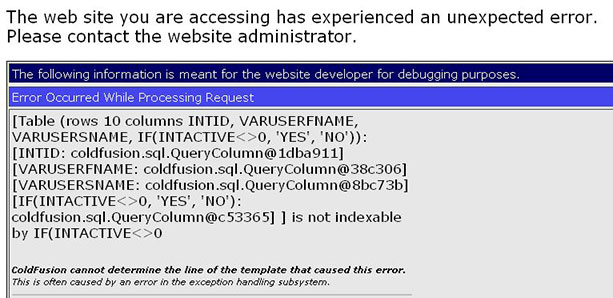
After a little tweaking it seems that if you alias the field it does work. In the example code below I've simply aliased the field with its own name.
I'm not exactly clear why, as the error message above isn't all that helpful.
2SELECT intid,varuserfname,varusersname, IF(intactive<>0, 'Yes', 'No') as intactive
3FROM table.users


