


|
Pop quiz! Create an object of items and counts from a paragraph of text |
||||||||
I was digging around in some old code the other day, having a 'server' tidy up, and I came across a pair of code challenges that a company set for me a few years back. They were to try and gauge how you approach a problem, and see if you are at least familiar with the cfml code base. I quite like Ray Camden's Friday challenge idea, so in a blatant homage, I'm posing these two code challenges in the same way. This one this week, and a numeric one next week.
The challenge:
Take a paragraph of text and return a data object(whatever format you want) of the words in it, and their frequency. This is the example paragraph given.
2then she put them up and looked out under them. She seldom or never looked THROUGH
3them for so small a thing as a boy; they were her state pair, the pride of her heart,
4and were built for "style," not service -- she could have seen through a pair of
5stove-lids just as well.
The type of object and the method of producing it are entirely open. You an choose how to handle punctuation and text casing.
I've written a test form, and a solution myself, but it is always interesting to see how different minds approach the same problem.
I'll give it a while, and then post my solution here.
Update Here is a CFC that I put together to solve this. It strips out the punctuation, and creates a Structure of the words, and their count.
2
3 <cffunction name="parseText" hint="Parses a passed in section of text, returns a struct of values" access="public" output="true" returntype="Struct">
4 <cfargument name="rawString" required="true" hint="Text to parse">
5
6 <!--- list items to remove --->
7 <cfset var itemsToRemove = '-,;,",.'>
8 <cfset var parsedString = structNew()>
9 <cfset var part = "">
10
11 <!--- Clean the punctuation out of the arg --->
12 <cfset var cleanedString = ReplaceList(arguments.rawString, itemsToRemove, " ")>
13 <cfset cleanedString = lCase(Replace(cleanedString, ",", " ", "ALL"))>
14
15 <cfloop list="#cleanedString#" index="part" delimiters=" ">
16 <cfif NOT StructKeyExists(parsedString, "#part#")>
17 <!--- Add to struct --->
18 <cfset parsedString[part] = 1>
19 <cfelse>
20 <!--- increment count, get it and add one --->
21 <cfset parsedString[part] = parsedString[part] + 1>
22 </cfif>
23 </cfloop>
24
25 <cfreturn parsedString />
26 </cffunction>
27
28</cfcomponent>


|
Converting Word Press Cumulus plugin to BlogCFC |
||||||||
The other day I saw the Word Press Blog Cumulus plugin (http://wordpress.org/extend/plugins/wp-cumulus/) on a fellow bloggers site, and thought 'I like that, I wonder if it will work inside the Blog CFC framework'. I thought I'd convert it so that it would.
The Cumulus plugin uses the regular Blog category cloud and turns it into a three dimensional rotating globe. It does this using a flash object, and a series of parameters passed in as flashvars.
2 <div id="flashcontent">This will be shown to users with no Flash or Javascript.</div>
3
4 <s/cript type="text/javascript">
5 var so = new SWFObject("#application.rootURL#/includes/tagcloud.swf", "tagcloud", "170", "120", "7", "##ffffff");
6 // uncomment next line to enable transparency
7 //so.addParam("wmode", "transparent");
8 so.addVariable("tcolor", "0x3258B8");
9 so.addVariable("mode", "tags");
10 so.addVariable("distr", "true");
11 so.addVariable("tspeed", "100");
12 so.addVariable("tagcloud", "#variables.tagsList#");
13 so.write("flashcontent");
14 </s/cript>
You need to include the 'swobjects.js' reference call to process to swf, otherwise the 'flashcontent' div will be displayed.
The flashvars include the variable 'tagcloud', this controls which tags are displayed, what their colors are, and where the go (URL). These are generated in a cfsavecontent variable almost as a list.
2 <cfif tags.tagCount EQ min>
3 <cfset size="9">
4 <cfelseif tags.tagCount EQ max>
5 <cfset size="20">
6 <cfelseif tags.tagCount GT (min + (distribution*2))>
7 <cfset size="16">
8 <cfelseif tags.tagCount GT (min + distribution)>
9 <cfset size="13">
10 <cfelse>
11 <cfset size="11">
12 </cfif><a href='#application.rootURL#/index.cfm?mode=cat%26catid=#tags.categoryid#' style='#size#' <cfif len(variables.color)> color='0x#variables.color#' </cfif> <cfif len(variables.hicolor)> hicolor='0x#variables.hicolor#' </cfif> >#lcase(tags.tag)#</a></cfloop></tags></cfsavecontent>
The swf will control the color of the Tags based on their sizing, or you can specify a 'color' and a 'hicolor', which are the regular color and the highlight color respectively. I have placed the swfobject.js and the tagcloud.swf in my site/includes/ directory, but you can put it where you want, just edit the links.
You can download the code from RIA forge here: Link
Thanks to Roy Tanck for the documentation on how the Cumulus plugin works:
http://www.roytanck.com/2008/05/19/how-to-repurpose-my-tag-cloud-flash-movie/
|
Uploading an image and previewing the thumbnail in one hit |
||||||||
A recent piece of functionality required a user to be able to upload an image, and view a thumbnail of that image alongside all the other related details that they were entering (item specific data etc).
After having a look through several forums it seemed that people's opinions were split on whether this could be accomplished using Ajax at all. So I decided to go old school and use an iFrame. I'm not a big fan of frames in any incarnation, but in this case I was willing to make an exception.
So firstly there is an upload form. It is a pretty standard ColdFusion form. Just remember when uploading a file to set the enctype="multipart/form-data". Also the submit button does not submit the form, it fires a JavaScript function 'changeFrame()'. The JavaScript function sets the target of the form submission to the iFrame, and then submits it.
2 <iframe id="uploadFrame" name="uploadFrame" src="action.cfm" height="110" width="90" scrolling="no" frameborder="0"></iframe>
3
4<form name="uploader" action="action.cfm" method="post" enctype="multipart/form-data">
5 <input type="file" name="image" size="5">
6 <input type="button" name="action" value="Upload" onclick="changeFrame()"/>
7 </form>
8</div>
9
10<s/cript>
11function changeFrame()
12 {
13 document.getElementById('uploader').target = 'uploadFrame';
14 document.getElementById('uploader').submit();
15 }
16</s/cript>
The form submits to the 'action.cfm' template. This template displays a placeholder image thumbnail initially, but when the form is submitted it performs the file upload using cffile, then displays the newly uploaded file instead of the placeholder. Ideally at this point I would like to resize the image with cfimage, but my hosting company is still using ColdFusion 7, so I may have to use a third party tag to do the same.
2<cfset dest = "webroot/root/tmp/">
3
4<cfif isdefined('form.image')>
5 <cffile action="upload" filefield="form.image" destination="#dest#" nameconflict="makeunique">
6 <cfset variables.img = cffile.clientFile>
7<cfelse>
8 <cfset variables.img = "holder.gif">
9
10</cfif>
11
12<cfoutput><img src="tmp\#variables.img#" height="100" width="75" border="1"></cfoutput>
13</body>
It is a shame I had to use an iFrame, and it would be really interesting to see if this is possible in a more web 2.0 scripted way.
|
ColdFusion structures and case sensitivity examples |
||||||||
Having been using Flex a little more recently I stumbled upon an old issue that I had previously addressed, but it had become second nature, and so I had forgotten about having to learn a workaround in the past. Passing objects from ColdFusion to Flex can be tricky at times, especially as ColdFusion is generally not case sensitive, but Flex is, and this can lead to problems.
I had previously found that how you build your Structure will have an impact the case of the keys. Example one is a Structure built using the traditional dot notation, in a CF 7 and below method:
2 newStruct = structNew();
3 newStruct.starter = "Prawn Salad";
4 newStruct.maincourse = "Roast Chicken";
5 newStruct.desert = "Apple Pie";
6</cfscript>
7
8<cfdump var="#newStruct#" label="Dot notation">
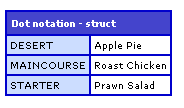
This is the older way of building a Structure, notice how all the keys are uppercase.
The second example is very similar, except that it is using associative array notation, IE brackets to denote the key values, rather than dot notation.
2 newStruct = structNew();
3 newStruct["starter"] = "Prawn Salad";
4 newStruct["maincourse"] = "Roast Chicken";
5 newStruct["desert"] = "Apple Pie";
6</cfscript>
7
8<cfdump var="#newStruct#" label="Struct notation">
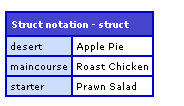
Since I originally looked at this ColdFusion 8 (and now 9!) have been released. ColdFusion 8 introduced a new way of creating structures, what casing does this use?
2 starter = "Prawn Salad",
3 maincourse = "Roast Chicken",
4 desert = "Apple Pie"
5} />
6
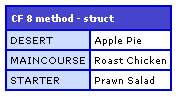
7<cfdump var="#newStruct#" label="CF 8 method">
It also creates an uppercase structure. I haven't really played around with this method enough to see if there is another way of creating a lowercase structure, so for now I'll be sticking to the older associative array method of creating my structures. That way they are easily transferred as a Flex object.


