Shaun Mccran

My digital playground
 
23
J
U
L
2010

Flex webservices security error accessing url

I've been working with some client side flash developers recently and we came across an unusual error that was being thrown in a Flex application when we were sending a webservice request to a Coldfusion server.

The error was "Security error accessing URL". I thought I'd overcome this a long time ago by using the cross-domain.xml file to allow server access to services.

It appears that there is a security issue with Flash 9 that requires the following line to be added to the CrossDomain.xml file:

view plain print about
1<allow-http-request-headers-from domain="*" headers="SOAPAction"/>

I'm guessing that it is enabling access for SOAP requests to any remote services on that server.

 
13
O
C
T
2009

ColdFusion structures and case sensitivity examples

Having been using Flex a little more recently I stumbled upon an old issue that I had previously addressed, but it had become second nature, and so I had forgotten about having to learn a workaround in the past. Passing objects from ColdFusion to Flex can be tricky at times, especially as ColdFusion is generally not case sensitive, but Flex is, and this can lead to problems.

I had previously found that how you build your Structure will have an impact the case of the keys. Example one is a Structure built using the traditional dot notation, in a CF 7 and below method:

view plain print about
1<cfscript>
2    newStruct = structNew();
3    newStruct.starter = "Prawn Salad";
4    newStruct.maincourse = "Roast Chicken";
5    newStruct.desert = "Apple Pie";
6
</cfscript>
7
8<cfdump var="#newStruct#" label="Dot notation">
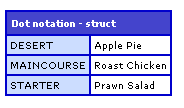
This is the older way of building a Structure, notice how all the keys are uppercase.

The second example is very similar, except that it is using associative array notation, IE brackets to denote the key values, rather than dot notation.

view plain print about
1<cfscript>
2    newStruct = structNew();
3    newStruct["starter"] = "Prawn Salad";
4    newStruct["maincourse"] = "Roast Chicken";
5    newStruct["desert"] = "Apple Pie";
6
</cfscript>
7
8<cfdump var="#newStruct#" label="Struct notation">
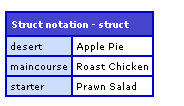
Since I originally looked at this ColdFusion 8 (and now 9!) have been released. ColdFusion 8 introduced a new way of creating structures, what casing does this use?

view plain print about
1<cfset newStruct = {
2    starter = "Prawn Salad",
3    maincourse = "Roast Chicken",
4    desert = "Apple Pie"
5} /
>

6
7<cfdump var="#newStruct#" label="CF 8 method">
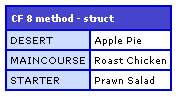
It also creates an uppercase structure. I haven't really played around with this method enough to see if there is another way of creating a lowercase structure, so for now I'll be sticking to the older associative array method of creating my structures. That way they are easily transferred as a Flex object.

 
26
A
U
G
2009

Example of inserting a Struct() into a database using keys

A while ago a colleague and I were working on a timesheet application in Flex. The idea was that you could commit a custom timebar object, generated in flex, and it would update the dataset in the back end using the ColdFusion flex gateway.

I came across the code recently, and decided to tidy it up a bit, and make the query dynamic, based on the Struct contents. The obvious limitation to this is that your Struct and your database schema have to match exactly.

I won't go into the Flex application here, but I've emulated its input arguments here with a pre-populated structure.

view plain print about
1<cfscript>
2 timesheetTask = StructNew();
3 StructInsert(timesheetTask, "employeeid", '36');
4 StructInsert(timesheetTask, "timesheetDT", '0');
5 StructInsert(timesheetTask, "projectid", '6');
6 StructInsert(timesheetTask, "weekid", '25');
7 StructInsert(timesheetTask, "taskid", '39');
8 StructInsert(timesheetTask, "hours", '8');
9 StructInsert(timesheetTask, "comment", 'Comments for this task live here');
10 StructInsert(timesheetTask, "szStatus", '1');
11 StructInsert(timesheetTask, "iFirstLineApproval", '23');
12 StructInsert(timesheetTask, "iSecondLineApproval", '34');
13 StructInsert(timesheetTask, "iCurrentApprover", '');
14 StructInsert(timesheetTask, "szRejectReason", '');
15 StructInsert(timesheetTask, "szDescription", '');
16
17 updateTimesheet = createObject("component", "timesheet");
18 updateTimesheet.updateTask(timesheetTask);
19
</cfscript>

Notice that this code also calls the CFC object at the end. The data itself isn't massively important, it's a time object for recording tasks.

Next we have the function, which accepts a Struct() argument called 'taskStruct'. I then loop through the structure, and populate a SQL query using the keys from a collection. The only logic is a check to see if it is the last structure element, as this controls the ',' placement.

view plain print about
1<cffunction name="updateTask" access="remote" returntype="string" hint="Creates a record for timesheet tasks">
2 <cfargument name="taskStruct" type="struct" required="yes">
3 <cfset var count = 0>
4
5 <cfdump var="#arguments.taskStruct#">
6 <cfset variables.structSize = structCount(arguments.taskStruct)>
7
8 <cfquery datasource="#application.dsn#">
9 INSERT INTO [dbo].[timesheet]
10 (<cfloop collection="#arguments.taskStruct#" item="key">
11 [#key#]
12 <cfset count = count + 1>
13 <cfif count LT variables.structSize>,</cfif>
14 </cfloop>)
15
16 <cfset count = 0>
17
18 VALUES(<cfloop collection="#arguments.taskStruct#" item="key">
19 '#arguments.taskStruct[key]#'
20 <cfset count = count + 1>
21 <cfif count LT variables.structSize>,</cfif>
22 </cfloop>)
23 </cfquery>
24
25 <cfreturn true>
26 </cffunction>

That will insert your Struct into a database, in small and tidy manner. It was somewhere around here that we started using cfproperty tags, and creating strongly typed objects for Flex.

 
03
A
P
R
2009

AIR Phone Book application - Part 3 (Full code)

Below is the full code in one run for the PhoneBook AIR application.

view plain print about
1<?xml version="1.0" encoding="utf-8"?>
2<mx:WindowedApplication xmlns:mx="http://www.adobe.com/2006/mxml" layout="absolute" initialize="init()"
3    height="280" width="294" horizontalAlign="center" verticalAlign="middle" showFlexChrome="false"
>

4
5<mx:Script>
6    <![CDATA[
7    
8     import mx.controls.Alert;
9 import mx.collections.*;
10 import mx.rpc.events.FaultEvent;
11 import mx.rpc.events.ResultEvent;
12 import mx.collections.ArrayCollection;
13
14     [Bindable]
15     private var loadedData:ArrayCollection;
16
17 public function init():void
18 {
19        // start the move listener
20
        moveListener()
21     // get the remote data
22
    getData()
23 }
24
25 public function moveListener():void
26 {
27        // mover event
28
        outerCanvas.addEventListener( MouseEvent.MOUSE_DOWN, moveWindow );     
29 }
30
31 public function getData():void
32 {
33     popData.getData();
34 }
35
36     public function moveWindow( event:MouseEvent ):void
37     {
38        var str:String = event.target.valueOf();
39
40         // if its a datagrid then don't do the move
41
         if ( str.search("displayPeople") >= 1)
42         {
43             // Do nothing
44
         }
45         else
46         {
47             stage.nativeWindow.startMove();
48         }
49     }
50    
51     public function onMinimize():void
52     {
53         stage.nativeWindow.minimize();
54     }
55    
56     public function onClose():void
57     {
58         stage.nativeWindow.close();
59     }
60
61     public function resultsHandler(event:ResultEvent):void
62     {
63        // trace(event.result)
64
        displayPeople.dataProvider = popData.getData.lastResult
65     }
66
67     public function faultHandler(event:FaultEvent):void
68     {
69        Alert.show("Error: " + event.fault.faultString, "Application Error");
70     }
71
72     public function changeImage(img:String):void
73     {
74         userImage.visible = true
75         userImage.source = "http://www.url.co.uk/wld/phonebook/" + img
76
     }
77
78 ]]>
79</mx:Script>
80
81<mx:Style>

82    .header {color: #70c7f1;}
83    .greyHeader {color: #777879;}
84    .controls {color: #000000; font-size: 13pt;}
85</mx:Style>

86
87     <mx:WebService id="popData" wsdl="http://www.url.co.uk/wld/services/phoneBook.cfc?wsdl" showBusyCursor="true" useProxy="false">

88 <mx:operation name="getData" fault="faultHandler(event)" result="resultsHandler(event)" />
89 </mx:WebService>
90
91     <mx:Fade id="fadeOut" duration="1.0" alphaFrom="1.0" alphaTo="0.0"/>
92 <mx:Fade id="fadeIn" duration="2000" alphaFrom="0.0" alphaTo="1.0"/>
93
94    <mx:Canvas id="outerCanvas" x="0" y="0" width="220" height="240" backgroundColor="#70c7f1" borderStyle="solid" cornerRadius="25" borderThickness="0">
95    
96        <mx:Canvas id="innerCanvas" x="10" y="22" width="200" height="210" backgroundColor="#FFFFFF" borderStyle="solid" cornerRadius="25" borderThickness="0">
97            
98            <mx:Label x="10" y="10" text="White label" id="header" styleName="header" fontWeight="bold"/>
99            <mx:Label x="78" y="10" text="Dating PhoneBook" styleName="greyHeader" fontWeight="bold"/>
100            <mx:DataGrid id="displayPeople" x="10" y="32" width="180" height="108" itemClick="changeImage(displayPeople.selectedItem.IMAGE)">
101                <mx:columns>
102                    <mx:DataGridColumn headerText="Name" width="140" dataField="NAME"/>
103                    <mx:DataGridColumn headerText="No." width="40" dataField="NO"/>
104                    <mx:DataGridColumn headerText="Img" width="40" dataField="IMAGE" visible="false"/>
105                </mx:columns>
106            </mx:DataGrid>
107            <mx:Image x="138" y="150" source="@Embed(source='wldLogoTiny.png')" />
108            <mx:Image x="25" y="144" toolTip="{displayPeople.selectedItem.NAME}" id="userImage" visible="true" showEffect="{fadeIn}" />
109        </mx:Canvas>
110        <mx:Label text="_" styleName="controls" toolTip="Minimize" x="173" y="-2" click="onMinimize()" />
111        <mx:Label text="X" styleName="controls" toolTip="Close" x="184" y="1" click="onClose()" />
112
113    </mx:Canvas>
114
115</mx:WindowedApplication>
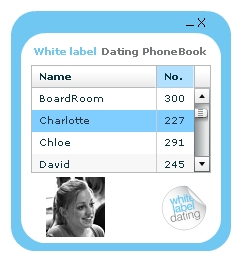
PhoneBook screen shot

 
03
A
P
R
2009

AIR Phone Book application - Part 2 (Functions and WebService)

As our application starts I want to fire the request for data, so we call an init() method on initialization. Also I have turned the flex chrome off here with 'showFlexChrome="false"'.

The init() method calls an event listener that controls the window movement (Drag and drop) and makes a call to getData().

view plain print about
1import mx.controls.Alert;
2 import mx.collections.*;
3 import mx.rpc.events.FaultEvent;
4 import mx.rpc.events.ResultEvent;
5 import mx.collections.ArrayCollection;
6
7     [Bindable]
8     private var loadedData:ArrayCollection;
9 public function init():void
10 {
11        // start the move listener
12        moveListener()
13     // get the remote data
14     getData()
15 }

The moveListener() method adds a listener to the outerCanvas element which forms the application 'border'. When this event is fired it calls moveWindow.

The getData() function calls the webservice, and specifies which method to call.

view plain print about
1public function moveListener():void
2 {
3        // mover event
4        outerCanvas.addEventListener( MouseEvent.MOUSE_DOWN, moveWindow );     
5 }
6
7 public function getData():void
8 {
9     popData.getData();
10 }
11     public function moveWindow( event:MouseEvent ):void
12     {
13        var str:String = event.target.valueOf();
14
15         // if its a datagrid then don't do the move
16         if ( str.search("displayPeople") >
= 1)
17         {
18             // Do nothing
19         }
20         else
21         {
22             stage.nativeWindow.startMove();
23         }
24     }

The moveWindow function also contains a check to see if the datagrid was the event target, as this was interfering with the functionality of the Datagrid. It would be interesting to see if anyone else has a more elegant solution to this, rather than a specific element check.

To populate our datagrid we need to use a data provider. In FLEX applications I usually use the RemoteObject function, but for AIR I've been using the WebService tag.

view plain print about
1<mx:WebService id="popData" wsdl="http://url/wld/services/phoneBook.cfc?wsdl" showBusyCursor="true" useProxy="false">
2 <mx:operation name="getData" fault="faultHandler(event)" result="resultsHandler(event)" />
3 </mx:WebService>

The final two 'chrome' functions we need are the minimize and close functions. I will detail handling custom chrome in another article.

view plain print about
1public function onMinimize():void
2     {
3         stage.nativeWindow.minimize();
4     }
5    
6     public function onClose():void
7     {
8         stage.nativeWindow.close();
9     }

Our WebService is referencing two functions. A results handler and a fault handler.

view plain print about
1public function resultsHandler(event:ResultEvent):void
2     {
3        // trace(event.result)
4        displayPeople.dataProvider = popData.getData.lastResult
5     }
6
7     public function faultHandler(event:FaultEvent):void
8     {
9        Alert.show("Error: " + event.fault.faultString, "Application Error");
10     }

The resultsHandler() simply assigns the datagrids dataprovider as the result of the WebService call. By adding DataGridColumn's to the datagrid with the right naming convention our results from the returned query object will map directly to our datagrid.

The faultHandler() function simply Alerts a user to a fault event.

Lastly I have a function that assigns the image source dynamically based on the click event in the datagrid.

view plain print about
1public function changeImage(img:String):void
2     {
3         userImage.visible = true
4         userImage.source = "http://url/wld/phonebook/" + img
5     }

So that completes the Phone Book AIR application. There are one or two tweaks I'd like to make in the image handling, but otherwise its exactly the spec I had in mind.

You can view the full code here.

 
03
A
P
R
2009

AIR Phone Book application - Part 1 (CFC and GUI)

I'm always asking what peoples phone numbers are in the office, we currently don't have any internal communications (like an intranet) so I thought I'd create a handy phone book application in AIR.

With FLEX of AIR applications I often wireframe them up with the data model in mind first. If you know what data you are going to display, and the format and delivery mechanism of that data, it can often have a large impact on the design and layout of your application.

In this instance I was just returning a simple query object of users and their phone numbers and a thumbnail image.

The CFC

My preferred server language is ColdFusion, so my service is a CFC object.

view plain print about
1<cfcomponent hint="WLD phoneBook" output="false">
2
3    <cffunction name="getData" access="remote" hint="Gets phoneBook data" returntype="query">
4    
5        <cfquery datasource="#application.dns#" name="qGetPB">
6            select     id AS ID,
7                    name AS Name,
8                    number AS No,
9                    image As Image
10            from phonebook
11            Order by name
12        </cfquery>
13
14        <cfreturn qGetPB>
15    </cffunction>
16    
17</cfcomponent>

In my example I'm using an MS SQL database, so I have included the creation script here:

view plain print about
1SET ANSI_NULLS ON
2GO
3SET QUOTED_IDENTIFIER ON
4GO
5SET ANSI_PADDING ON
6GO
7CREATE TABLE [dbo].[phonebook](
8    [id] [int] IDENTITY(1,1) NOT NULL,
9    [name] [varchar](20) NULL DEFAULT (NULL),
10    [number] [int] NULL DEFAULT (NULL),
11    [image] [varchar](55) NULL DEFAULT (NULL)
12) ON [PRIMARY]
13
14GO
15SET ANSI_PADDING OFF

Now that we know what the data will look like we can build the GUI front end.

My display layer is going to be a canvas, with another canvas inside it, to create a bordered effect.

Then I have a DataGrid, with a click event that will call an AS function. This will control the displaying of an image that corresponds to the user being clicked. Its always nice to see who you want to call!

view plain print about
1<mx:Fade id="fadeOut" duration="1.0" alphaFrom="1.0" alphaTo="0.0"/>
2<mx:Fade id="fadeIn" duration="2000" alphaFrom="0.0" alphaTo="1.0"/>
3    <mx:Canvas id="outerCanvas" x="0" y="0" width="220" height="240" backgroundColor="#70c7f1" borderStyle="solid" cornerRadius="25" borderThickness="0">
4    
5        <mx:Canvas id="innerCanvas" x="10" y="22" width="200" height="210" backgroundColor="#FFFFFF" borderStyle="solid" cornerRadius="25" borderThickness="0">
6            
7            <mx:Label x="10" y="10" text="White label" id="header" styleName="header" fontWeight="bold"/>
8            <mx:Label x="78" y="10" text="Dating PhoneBook" styleName="greyHeader" fontWeight="bold"/>
9            <mx:DataGrid id="displayPeople" x="10" y="32" width="180" height="108" itemClick="changeImage(displayPeople.selectedItem.IMAGE)">
10                <mx:columns>
11                    <mx:DataGridColumn headerText="Name" width="140" dataField="NAME"/>
12                    <mx:DataGridColumn headerText="No." width="40" dataField="NO"/>
13                    <mx:DataGridColumn headerText="Img" width="40" dataField="IMAGE" visible="false"/>
14                </mx:columns>
15            </mx:DataGrid>
16            <mx:Image x="138" y="150" source="@Embed(source='wldLogoTiny.png')" />
17            <mx:Image x="25" y="144" toolTip="{displayPeople.selectedItem.NAME}" id="userImage" visible="true" showEffect="{fadeIn}" />
18        </mx:Canvas>
19        <mx:Label text="_" styleName="controls" toolTip="Minimize" x="173" y="-2" click="onMinimize()" />
20        <mx:Label text="X" styleName="controls" toolTip="Close" x="184" y="1" click="onClose()" />
21
22    </mx:Canvas>

My 'userImage'has a showEffect attribute, that uses an image fadeIn method. It fades in the first image called, but not any others, I've had a play around with this, and I can't get it to fade in subsequent images, so if anyone has any ideas let me know!

Lastly I have added some chrome controls, as I will be removing the standard chrome, and building my own.

Now, on to the functions.

 
02
A
P
R
2009

Adobe AIR Web Service Hello World test application

I've recently been looking at putting together some AIR applications. I've used FLEX for a few years now, and have only just come up with some useful AIR ideas, so I thought I'd build an application or two.

Usually I would use flash remoting, but I haven't spent too much time investigating how this works in AIR, so I've opted for the old school Web Service.

In the middle of my newest AIR application I stumbled upon an issue. No matter what I did I was receiving a 'HTTP Error' response from my Web Service. After stumbling around in the dark for a while tweaking code to no avail, I decided to write the most basic Web Service I could think of.

So here is 'Hello World', as a Web Service call from AIR.

Firstly create a call to your Web Service. In this case it was a local file. Point the wsdl variable at the fully qualified path to your service. I am using a coldFusion back end, so it is a CFC. This is also where you specify the fault handler and result handlers. You can add as many 'operation' methods here as you want, that way you address specific functions in your service individually.

view plain print about
1<mx:WebService id="getMessages" wsdl="http://192.168.XX.XXX/root/services/message.cfc?wsdl" showBusyCursor="true">
2 <mx:operation name="sayHello" fault="faultHandler(event)" result="resultsHandler(event)" />
3 </mx:WebService>
4     <mx:Button x="10" y="10" label="Click me" click="getData()"/>
5    
6</mx:WindowedApplication>

I've also added a button that will call a function to action the service call.

Next we will add the functions.

view plain print about
1<?xml version="1.0" encoding="utf-8"?>
2<mx:WindowedApplication xmlns:mx="http://www.adobe.com/2006/mxml" layout="absolute">
3
4<mx:Script>
5    <![CDATA[
6        import mx.rpc.events.ResultEvent;
7        import mx.rpc.events.FaultEvent;
8        import mx.controls.Alert;
9        
10 private function getData():void{
11     getMessages.sayHello();
12     
13 }
14
15     private function faultHandler(event:FaultEvent):void
16     {
17        Alert.show("Error: " + event.fault.faultString, "Application Error");
18     }
19
20     private function resultsHandler(event:ResultEvent):void
21     {
22        Alert.show(String(event.result))
23        
24     }
25    
26    ]]>
27</mx:Script>

A getter function, that will actually send the Service request, a fault handler that will simply Alert the user to a fault event, and a result handler that Alerts the user to whatever message is returned from the Web Service.

The CFC

The CFC service is a simply object to return a string. Just make sure that your 'Access' is set to remote.

view plain print about
1<cfcomponent displayname="message">
2
3
4    <cffunction name="sayHello" displayname="sayHello" hint="it says hello" access="remote" output="true" returntype="String">
5        
6        <cfset var message = "Hello world">
7        
8        <cfreturn message/>
9    </cffunction>
10
11</cfcomponent>

So we end out with:

 
01
D
E
C
2008

Returning useful error messages from CFC's in Flex

One thing I've learnt from my flex to CFC tomfoolery is that sometimes flex doesn't diplay very good error messages from CFC's. This is no fault of flex, but more usually a problem with the interface between it, and CF, as most of the unfriendly error messages you get are http error strings, which usually get truncated as they are raw code, so you don't get to see the problem then either.

So you need more elegant error handling in your CFC's. (or whatever back end your using)

Here is a complete script as an example, we will go through it line by line:

view plain print about
1<cfcomponent displayname="Data Object" hint="Generic data object" output="false">
2
3
4    <cffunction name="selectRecords" hint="Returns a query object based on an id" access="public" output="false" returntype="Any">
5        <cfargument name="id" required="true" type="String" hint="An id to use in the query below">
6
7            <cfset var message = "">
8
9            <!--- TRY the transaction below, throw a catch message --->
10            <cftry>
11    
12                <cfif NOT isNumeric(arguments.id)>
13                    <cfset message = "Id was not a number">
14                </cfif>
15    
16                <cfquery datasource="#application.dsn#" name="qGetRecordById">
17                    SELECT id, name, age, sex, telephone, mobile, address, postcode, county, country
18                    FROM memberTable
19                    Where id = #arguments.id#
20                </cfquery>
21    
22            <cfcatch>
23                <cfthrow message="cfcatch.message">
24
25                            <cfreturn message>
26            </cfcatch>
27            
28            </cftry>
29        
30        <cfreturn qGetRecordById />
31    </cffunction>
32</cfcomponent>

So its a normal component, with one function, it accepts an 'ID' and performs a query, and returns it.

I am setting a local variable at the top, 'message' that will only be created and used inside the scope of the CFC. Then we will 'TRY' and do our transaction. At this point I'm wrapping everything in the cftry tag so as to encapsulate any possible code errors or logic faults.

Any logic I have here will replace the value of 'message' if proven to be false, and return that message rather than the query object I was expecting.

But you'll notice the lines:

view plain print about
1<cfcatch>
2                <cfthrow message="cfcatch.message">
3
4                <cfreturn message>
5            </cfcatch>

This will catch any errors from the try block, and throw them to flex. In this way flex receives the message in the throw command, not a http response message when the CFC breaks.

This is obviously a Coldfusion - CFC specific example, but I've seen very similar error trapping in php, working in exactly the same way, so it really doesn't matter what back end your using with flex.

More Entries


This content is purely my opinon, any offence or errors are unintentional, please comment your views appropriately
Site Credits
Aggregated by ColdfusionBloggers.org Powered by Coldfusion

Technology & Science Blogs - BlogCatalog Blog Directory Blog Directory & Search engine
