


|
Connecting Select form fields based on data selections Pt 1 |
||||||||
Whilst building a new form I discovered that I needed two select fields, one that contained a series of publication titles, and the second that contained the Issue numbers of whatever title was selected in the first field.
IE two selects, with the first controlling the seconds data.
I had a search around and it seems like there are many ways to do this, this by far seems to be the best, but it has a fatal flaw (detailed at the end).
Start off by creating a function call to setup your initial state. This will set the default value of the first select field, and populate the second field with its options.
2<!--- Set the default Series --->
3<cfset defaultSeries = 7>
4
5<scri pt type="text/javascript">
6var done = false;
7function SelectDefault(x,val) {
8 if(!done) {
9 var dd = document.getElementById('intId');
10 for(var i = 0; i < dd.length; i++){
11 if(dd.options[i].value == val){
12 dd.selectedIndex = i;
13 }
14 }
15 done = true;
16 }
17}
18</scri pt>
Next create the form, and use the cfajaxproxy to bind the default values set above.
The form itself is a pair of cfselects, with the values bound to the response from a CFC (Series). I really like the way the notation works with this, the cfc:Name . function is really intuitive.
Notice how the binding on the second cfselect is passing through the value from the first 'intId' in this example. This is the argument passed to the CFC.
2<cfajaxproxy bind="javascript:SelectDefault({intId},#defaultSeries#)">
3
4<cfform name="exampleform" method="post">
5
6<cfselect name="intId" id="intId" value="intId" display="varName" bindonload="true" bind="cfc:Series.GetIssues()"/>
7<cfselect name="issueNo" id="issueNo" value="intIssueNo" display="intIssueNo" bind="cfc:Series.GetIssueNos({intId})"/>
8<cfinput type="submit" name="submit" value="Submit"/>
9</cfform>
10</body>
11</html>
So that is our form. The next code block is the CFC. It is a relatively straight forward CFC with two functions, each returning a list of data. The second requires an argument passed in from the cfselect above.
2 <cffunction name="GetIssues" access="remote" returntype="query">
3
4 <cfquery name="data" datasource="#application.dsn#">
5 SELECT [intId],[varName],
6FROM [dbo].table
7 Order by varName
8 </cfquery>
9
10 <cfreturn data>
11 </cffunction>
12
13 <cffunction name="GetIssueNos" access="remote" returntype="query">
14 <cfargument name="intId">
15 <cfquery name="data" datasource="#application.dsn#">
16 SELECT [intIssueNo]
17 FROM [dbo].table
18 where intSeriesId = <cfqueryparam value="#arguments.intId#" cfsqltype="cf_sql_integer">
19 </cfquery>
20 <cfreturn data>
21
22 </cffunction>
23
24</cfcomponent>
This just returns two different query objects. When this is all hooked up it works fantastically. Changing the first select changes the issue numbers in the second select.
My problem lies in the fact that this is all ColdFusion 8 functionality. Both cfajaxproxy and cfselect are coldfusion server version 8 tags. My hosting company is still using version 7! Which I discovered when I rolled this code out. (doh!)
So I have to find another solution, which follows shortly.
N.B. Thanks to several of Ben Forta and Ben Nadel's blog posts around similar subjects for guidance on this, they got me over a few stumbling blocks.


|
Long button issues in IE, a CSS fix |
||||||||
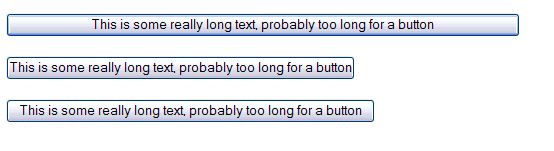
Long buttons in Internet Explorer:
The same buttons in Firefox:
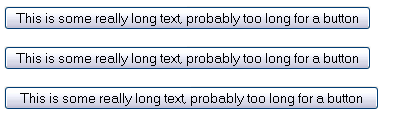
After looking at setting the margins, or the padding to 0, or even negative numbers nothing was working. Turns out you need to set the width to auto, and just let the text push out the width of the button using 'overflow:visible'. This is the CSS that generates the above buttons:
2#button{width:auto; overflow:visible;}
3
4#buttonPadded{width:auto; overflow:visible; padding-left: 10px; padding-right: 10px;}
5</style>
6
7<input type="submit" value="This is some really long text, probably too long for a button">
8<p />
9<input type="submit" value="This is some really long text, probably too long for a button" id="button">
10<p />
11<input type="submit" value="This is some really long text, probably too long for a button" id="buttonPadded">
|
Writing back to a multi select box using javascript |
||||||||
During the building of an online form I discovered that there was the need for a user to select multiple values from a select form field. This is done easily enough using multiple="true". What I then found was that I wanted them to be able to add more options to the select field, preferably without reloading the entire template. These options would then also be 'selected' on being added to the select box. Below is a test script demonstrating this.
Initially I created a standard select form field, and populate it with a simulated query.
2<cfset variables.qOptions = QueryNew( "id, name" ) />
3
4<cfset QueryAddRow( variables.qOptions ) />
5<cfset variables.qOptions[ "id" ][ variables.qOptions.RecordCount ] = "1" />
6<cfset variables.qOptions[ "name" ][ variables.qOptions.RecordCount ] = "Value 1" />
7
8<cfset QueryAddRow( variables.qOptions ) />
9<cfset variables.qOptions[ "id" ][ variables.qOptions.RecordCount ] = "2" />
10<cfset variables.qOptions[ "name" ][ variables.qOptions.RecordCount ] = "Value 2" />
11
12<cfset QueryAddRow( variables.qOptions ) />
13<cfset variables.qOptions[ "id" ][ variables.qOptions.RecordCount ] = "3" />
14<cfset variables.qOptions[ "name" ][ variables.qOptions.RecordCount ] = "Value 3" />
15
16<cfset QueryAddRow( variables.qOptions ) />
17<cfset variables.qOptions[ "id" ][ variables.qOptions.RecordCount ] = "4" />
18<cfset variables.qOptions[ "name" ][ variables.qOptions.RecordCount ] = "Value 4" />
19<select name="item" id="item" class="input_text" size="4" multiple="true">
20<cfloop query="variables.qOptions">
21 <option value="#variables.qOptions.id#">#variables.qOptions.name#</option>
22 </cfloop>
23</select>
Next we will add the form button that allows the user to add new values to the select field. The 'Add' button invokes the javascript function AddItem().
So a user enters their new item into the text box, and it is inserted into the select field drop down, and automatically selected.
2
3 var newItemValue = document.getElementById("newItem").value;
4 var list = document.getElementById('item');
5 var startNewNum = document.getElementById('item').options.length;
6
7 var newOption = new Option((newItemValue), newItemValue);
8
9 // do it if there is a value
10 if(newItemValue.length !== 0) {
11
12 newOption.selected = true;
13 list.options.add(newOption);
14
15 newItem.value = "";
16 window.alert('You new value has been added');
17
18 }
19 }
The javascript above gets the new item value, and inserts it as the last item in the select list. There is also a check to see if there is any text value in the form field. Just to round it off I remove the text field value, and alert the user.
There is probably a shinier way of doing this in something like JQuery, but I'm not that up to speed on that. It would be interesting to see an example though. (hint!).
|
Cross site Script hacking using the GET method |
||||||||
I've dealt with Cross Site scripting (XSS) attacks before ( http://www.mccran.co.uk/index.cfm/2009/4/6/Cross-Site-scripting-hack-test-form), so I'm familiar with the principles involved. In this example there is a subtle difference.
In the example above the vulnerability was created by POSTING a text string through the form action. In this example we will examine a similar vulnerability using GET. IE we will simply pass the attacking string through the url of the form, setting the form field value in the traditional 'url?variable=N' way.
To demonstrate this create a simple form:
2
3<form>
4
5<input type="text" name="formValue" size="20" value="<cfoutput>#attributes.formValue#</cfoutput>">
6<input type="submit" name="Action" value="Send">
7
8</form>
Call your form in a browser. Now append on the end of that url the text string below.
?attributes.formValue==>"><%2Ftitle><%2Fiframe><%2Fscript><%2Fform><%2Ftd><%2Ftr>
Reading through the string you'll notice that it is an Iframe constructor that is calling a url, in this case www.Google.com.
As the url is setting the value of 'attributes.formValue' this will be inserted into the form on the submit action. We are not posting it, so it will not be picked up by any custom POST action code.
One interesting point to mention here is that testing this in IE 8, it will actually be blocked by default, as it has detected that scripts are running over different domains.

So if you are in the habit of writing POST detection scripts, make sure you handle any other submissions as well!


