


|
F8 problems when installing Windows XP |
||||||||
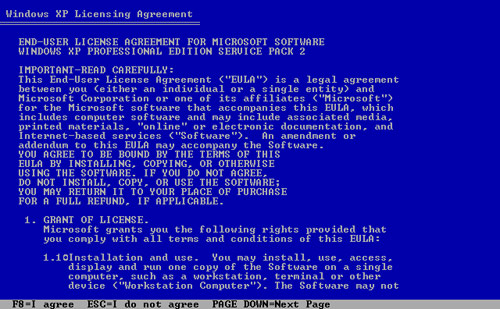
I was recently performing a windows XP rebuild for a client, and noticed that when I reached the EULA agreement in windows XP's installation routine I was prompted to 'press F8' to signify that I agreed to it.
The only problem was the F8 key was disabled! It appears that during a rebuild on top of an existing invalid installation of XP, windows will disable the function keys.
It was then that I noticed the function lock key. The Fn key works just like the scroll lock, or number lock keys, except that it disables/enables the function keys!
It was a simple matter to press Fn once, then press F8 to agree to the licence.
Still don't know why they are disabled during the installation though....


|
Mysql left and right functions |
||||||||
2 name,
3 RIGHT(url, 1) as slash
4 from table
5 where RIGHT(url, 1) != "/"
The RIGHT() function is similar, but it starts from the last character on the right, counting left to encapsulate the last seven characters.
In the SQL statement below, areaCode is reused to order the results set. To reformat the telephone number, it will be necessary to use the SUBSTRING() function.
2 RIGHT(telephone, 7) AS telNo
3 FROM contacts
4 ORDER BY areaCode;
5
6 SELECT CONCAT('(', LEFT(telephone, 3), ') ',
7 SUBSTRING(telephone, 4, 3), '-',
8 MID(telephone, 7)) AS 'Telephone Number'
9 FROM contacts
10 ORDER BY LEFT(telephone, 3);
|
Coldfusion Server connectiong to SQL Server Express 2005 |
||||||||
I've been using SQL Server Express for quite a while noa, and still prefer it to almost every other database application. I was rebuilding a development environment the other day, and discovered that I was using an ODBC "trusted connection" to connect to a SQL Server instance in Coldfusion Server. Why was this I thought?
It turns out that I'd had some problems getting Coldfusion to connect SQL Server datasource connection, so I'd used a custom ODBC connection. Looking into the connection error and having a dig around I found out a few things its worth checking when installing SQL Server.

1. First thing is to enable TCP/IP connectivity, as its not on by default. Go to Start -> All Programs -> Microsoft SQL Server 2005 -> Configuration Tools -> SQL Server Configuration Manager. Under SQL Server 2005 Network Configuration, click on Protocols for SQLEXPRESS, click on TCP/IP, and click enable. Then restart the service, which you can do from the Configuration Manager under the SQL Server 2005 Services area, or in windows services.
2. In my experience SQL Server always used to use port 1433 by default after installation. For some reason it hadn't used this port, it was using 1523. I was quite puzzled about this as I just used accepted the installation defaults. The port is a crucial setting when you're setting up your datasources for Coldfusion, otherwise CF wont even find the datasource, let alone attempt to connect. To check your port number, go to the SQL Server Configuration Manager, go to Network Configuration/Protocols again, right click on TCP/IP, choose Properties, then click on the IP Addresses tab. Look under IPAll in the TCP Dynamic Ports section. I personally wouldn't change this as I'm not really sure why SQL Server is using a different port now. I just used it in my Coldfusion datasource setup, and it connected fine.
|
"James Fashion" - Bangkok Tailors |
||||||||
A few friends of mine had recommended that whilst in Bangkok I have a look at getting some clothes made. I don't wear suits into the office anymore (thanks casual working regulations) but I thought I'd at least try the experience, see what it was all about.
Our holiday rep recommended an establishment called James Fashions. So on friday night a car was called, and we were driven there. One thing I will never get used to is shops/restaurants/etc that have cars. They pick you up for nothing! Its great!
The shop itself is a nice open space, stacked with racks and racks of cloth.
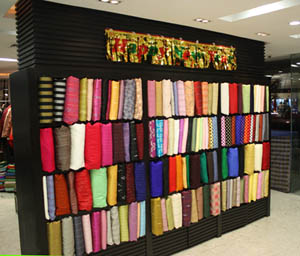
So twenty minutes later, I had picked out a couple of suit fabrics, and a few shirt fabrics. It was quite a novel process, as an adult male being measured up for a suit, but one that was very enjoyable.
A "catch up" fitting was scheduled for saturday afternoon, and by then the suit trousers were made, and both shirst were completed already! The suit jacket was half complete with several chalk markings on it, but was clearly on the way as well.
After making saturdays small adjustments, all the garments were delivered at 4pm on the sunday. I have to say I was pretty astounded at the quick turnaround, and the quality was fantastic, a well fitting good quality set of clothes. They weren't the cheapest clothes I've ever bought, but it was a great experience.
As a quick note, during the process of getting these clothes made I googled this company, and found a few negative reviews of them. I can honestly say that it was a great experience for me, so take the negative views with a pinch of salt. The sales guys were a little pushy, but overall I would highly recommend both these tailors, and the experience of getting clothes made in Thailand


