


|
Conceptual, Logical & Physical views of solutions |
||||||||
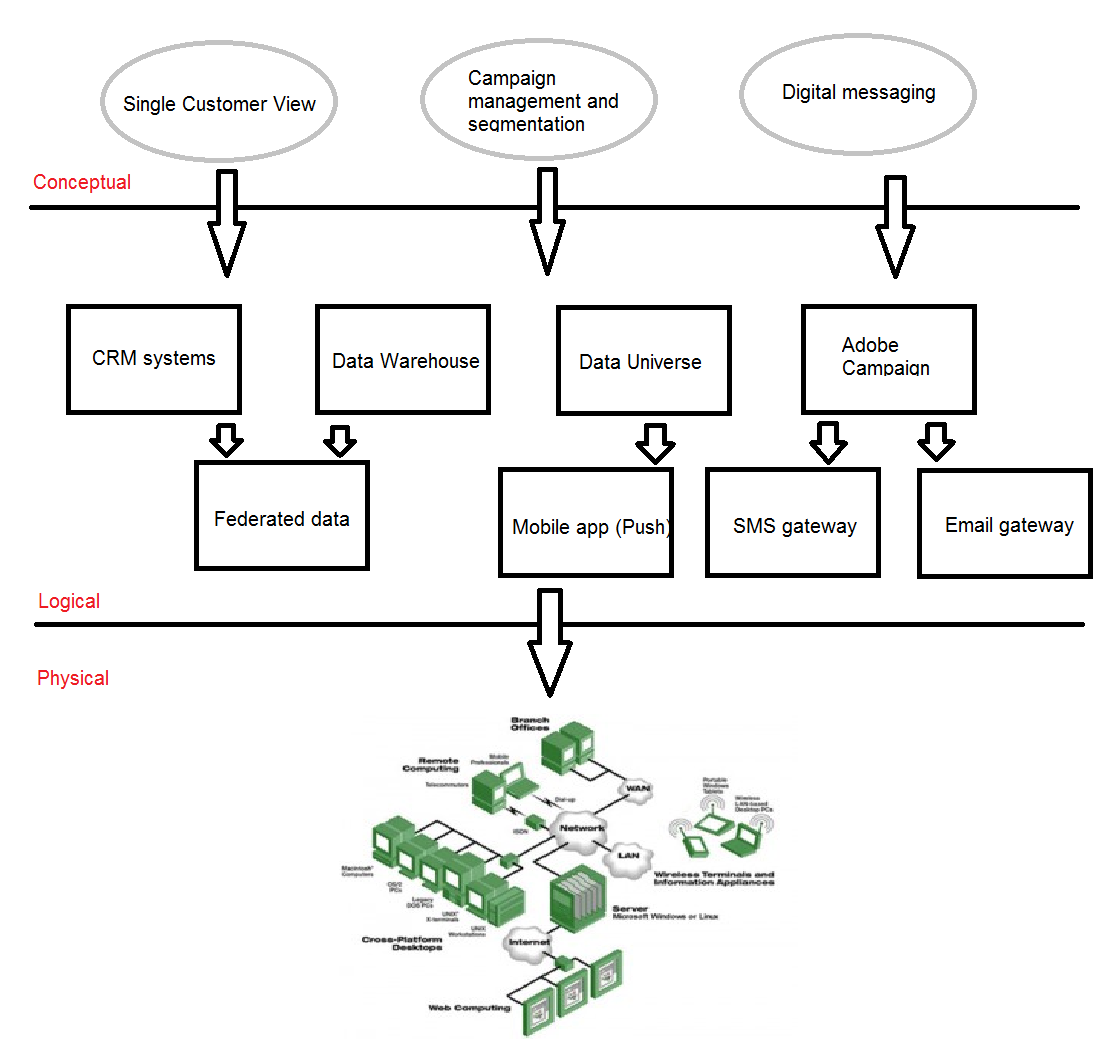
A while back I took a role in mentoring some less experienced architects with an aim to solidifying their architectural thinking and moving them out of a Business analysis and design way of thinking. As part of this in-house upskilling programme I started writing an example of the 'Conceptual-Logical-Physical' views and their relationship. Whilst researching it online I found the example below, from the Zachman site. This is a great example, and clearly shows why the three views exist, and how they convey the right level of information to the correct audience, allowing each role to perform in its own space with, aiming at the same solution, but not restricted by any of the other roles around them.
Conceptual, Logical, Physical architecture example
The "Owner": CONCEPTUALLY ..... "I would like a pot of flowers in the center of my patio about 10 feet off the ground. They would be purely for ascetic reasons, but I want the pot to be BIG and the flowers to be real."The "Designer": "Let me see now ... the physics of this situation would suggest that there are two LOGICAL alternatives ... either 1) you would have to have a pedestal about 10 feet high, the weight it would have to sustain is max of 100 pounds so if it was 10 square inches in area (cross-section) the material would have to hold 10 lbs per sq. inch. You're second alternative 2) would be to hang it from something above the pot ... do you have a roof over the patio?? If not, that would mean we would have to construct a tripod to suspend the pot from the apex. Do you care if you see the tripod? I recommend you go with the pedestal."
The "Builder:" "The Architect is suggesting a pedestal that would be 10 feet high and sustain 10 pounds per square inch. That Architect wouldn't recognize a lathe if he fell on one ... but here's what we could do ... we could PHYSICALLY build the thing in three pieces and then glue it together with superglue ... just in case, we could make flanges on the pieces so we could bolt the pieces together to make sure they don't come apart. Your other alternative is to have it made in Japan and ship it in one piece and then we could install it by drilling a hole in the patio, sinking the base down 2 feet and filling in the hole with cement.
For full disclosure, I have republished this from the Zachman site, the original is here


|
Can an Innovation lab fit into the classic Corporate model? |
||||||||
At a recent company event one of the leaders in my division presented his thoughts on designing and implementing an Innovation lab. The presenter, Daryl Wilkinson, Head of Group Innovation at Nationwide (Link: @DarylAndHobbes) put forward the idea of creating a digital Agency style innovation lab. This would allow a select group of Thinkers, Strategist and Developers to rapidly wireframe up services and applications/widgets and quickly prototype them into working, running applications.
I think this is a very interesting opportunity, but I think the radically different approaches between operating an Innovation Lab and a large-scale UK Corporate company may pose some interesting issues.
Having worked in a few smaller companies, particularly digital and marketing agencies I can see the value in this. The benefits of this sort of approach are many, including increased flexibility, ability to change direction quickly and a more open way of communicating and moving ideas around. A key principle that allows this way of working to be productive for smaller companies is the removal of barriers. These barriers might be Company rigidity, Governance rules, formulaic team structures and employee ego. By removing all of these things, you can take away, or minimise their impact on the way people think about opportunities and problems. By removing traditional working barriers, you encourage people to open up to new ways of thinking that is not constrained by traditional learnt behaviour. (This is often referred to as disruptive thinking). The two fold acts of giving them literal authority to become unconstrained in approach, and the removal of these business rules allows for a different, more agile operational model.
This also results in the blurring of responsibilities and roles within the team. Team members are far more inclined to own their own space, and stretch out into other member's spaces, as the boundaries between them are blurred, in a far more collaborative working approach.
Let us contrast that with the traditional UK corporate model. Typically, they have a far more rigid structure, with defined lines between departments and responsibilities. Employees have a role to play and generally, because of the luxury of scale, people are kept in that role, and find it difficult to venture too far into other roles without encountering resistance.
Add into the corporate mix a defined, constrictive Governance model, security policies, hard-wired policies and processes and a corporate operating model, and the attitudes that brings with it. These elements are in direct conflict with the outline described above, that not only enables but also drives an Innovation lab. How this newfound Innovation lab will integrate into a corporate environment, working its way through the barriers described here, will either enable or contain its success. It will be a tricky journey implementing, then maturing a lab like this into a working state. It could become an interesting bubble of productivity, living inside the corporate structure, creating ripples that disrupt the usual state of thinking within traditional departments. What better way to introduce change into your organisation than by having a department like this forge new ways of thinking and approaches to solutions.
I'll certainly keep an eye on how it develops, and see if any of these conflicts arise.
|
Micro transaction madness with Marvel Puzzle Quest |
||||||||
I'm a big fan of Puzzle games, and Marvel, so what could be better than a Marvel themed puzzle game?
The game itself is a classic three-in-a-row puzzle game just like the previous versions of Puzzle Quest games. It's the now 'classic' model of free-to-play but with in-game micro transactions through it. There are several resources used in the game, Iso-8 which is used to upgrade your hero's level and hero points, which are basically coins that you can use to but team slots to hold more characters, or to buy skills for characters.
You can play the game without purchasing anything at all, which is my preference or you can spend upwards of £80.00 on all the extras. Personally if it was priced at a sensible mobile price point I would have happily purchased it, it's the sheer volume of micro transactions present that is annoying. I don't know how or why the trend for Micro transactions started but the model is abhorrent. This whole game feels like a vehicle for micro transactions. Every way you try and play it you are faced with a transaction. The only other option is such soul crushing repetition that the game is almost unplayable. You really have to purchase a wealth of content if you want to even see half of the characters and powers in this game. |
 |
This is a real shame as the game is quite enjoyable, its just that the constant barrage of 'purchase me' advertising really starts to intrude on your enjoyment of actually playing the game. It feels like there is more 'purchasing advertisements' than puzzle matching.
So, I'd stay away from this game. Marvel should release a non 'free to play' version at £9.99 or £14.99 with all the content unlocked. I'd be happy to purchase in that model. Micro Transactions hidden in the 'free to play' games are a blight on the games industry. Its false advertising, plain and simple. There needs to be a change in policy, and a change in terminology, as this terms is just lies.
|
The problem with Agency life (PT1) |
||||||||
I've recently been discussing some of the aspects of Agency life with friends that have moved into that kind of environment and having some experience in it myself I thought I'd comment on what I consider to be some of the major differences between Agencies and more traditional working environments.
I found it quite an interesting, if challenging transition when I moved from a 'normal' office environment into an Agency space. There are several key differences that result in a distinctly different atmosphere. I think it's a combination of these differences that lead to the overall difference in the atmosphere and working practices.
For this first article I'm looking in more depth at the product and pricing models.
Products:
If you take a traditional office based working environment, the product they sell is a tangible, physical product or service. They occupy a specific market place, with a clearly defined remit and product to market and sell. This means they are an easily identified quantity. Think of the companies you know, at a brand level. Chances are you also know their associated product set.
For example:
Cadburys = Chocolate products
BT = Telephone products and services
GSK = Pharmaceuticals
There is a pretty clear relationship between the company and the product set / service. This leads to a situation internally where everyone is clear on the company vision, and more importantly knows what they are selling. It is clearly defined.
Now take an Agency model, where the product they are selling is themselves, and the services they bring to the table. This is a lot more ambiguous than a product set, and also results in quite a heavy marketing focus on the company as a commodity. I lost count of the number of times there were guided tours around the office that were trying to establish various individuals as credible experts in their field.
Think about that key difference for a second. When you go into the supermarket and pick up a product off the shelf you don't ask to see the product designer's credentials before you make that purchase, you are confident that the product is fit for purpose. In an Agency you are constantly selling yourself.
Pricing:
Consider the other side of the product 'Coin', the pricing model. If you have clearly defined products / services then you typically also have a clearly defined pricing model. Item 'X' costs 'Y' price, potentially with additional levels of pricing scale based on premium products.
Now look at the Agency model. Typically they have common offerings based on market sector and channel. If a client wants a DM campaign or a website then there are generally 'cookie cutter' processes for the Agency to go through. Obviously they don't like advertising this to clients as every client is special and receives a bespoke service (sic!) along with bespoke pricing.
The issue here is that the scope of the product varies considerably, which leads to the pricing varying considerably. This tends to be for two reasons.
1. Elements being resized during the project.
2. Some aspects of the project being prioritised over other aspects because they are deemed more important, or vice versa.
The tricky aspect to these two points is that a client has come to the Agency because they are the experts in their field. They are established best practice practitioners, and as such should be listened to. As is always the case in these things though, the people in charge of the money tend to control things. So where there is a push back on budget, the scope tends to change. Its at this point that the less tangible aspects of a project, often the most crucial aspects in my view, tend to get downsized or dropped altogether.
For a client it is very obvious to see if a graphic designer has built a header banner on a page. It is a large visible element, that to them justifies financial outlay. It's tangible. Look at the less tangible disciplines of Information architecture, User Interface design or User Experience planning. You cannot 'see' any of those project elements. Yet they contribute considerably more to the success of the project than the font choice or banner imagery.
This is a common conflict within Agency life. The push from the client to reduce the budget, but not the scope, and the push from the Agency to deliver on time and to budget, whilst accommodating (and compromising) on principles of the project.
This was the situation I found myself in frequently. Being an expert in the field, but being driven to compromise things you know, and have communicated, would affect the successful outcome of the project. Due to financial aspects that really shouldn't be up for discussion in the first place.


