


|
Geo coding Latitude and Longitude address in coldfusion using CFhttp |
||||||||
One piece of recently functionality to a site I'm writing is the ability to look up places on a Google powered map.
There are a variety of ways to insert a Google map into your site, but the first real hurdle is the lookup code.
Google does not use an address to position its map, it uses the Latitude and Longitude co-ordinates to place the map area around the desired location.
Google has pretty extensive documentation around this here:
http://code.google.com/apis/maps/documentation/geocoding/index.html
Rather than translate the locations on the fly on a per-hit basis I thought I would perform the lookup when the record is submitted to the database, that way I can cut down the number of google hits, and just reference the local data. Google also prefers this method, as it is less process intensive on their end of things.
First you need an API key:
http://code.google.com/apis/maps/signup.html
This application already has methods for setting the data in a table, so I am simply going to call another packaged method to calculate the latitude and longitude, and store them in the table with the other data.
2 <cfargument name="address" displayName="Address to Geo" type="string" hint="String of the address to Geo code" required="true" />
3 <cfset var geoDetails = structNew()>
4
5 <cfset var apiKey = "Your API key here">
6
7 <!--- initial string --->
8 <cfset var requestString = "http://maps.google.com/maps/geo?">
9
10 <!--- q= address to geo code --->
11 <cfset requestString = requestString & "q=28+Morley+Street,Swindon,SN1+1SG" & "&">
12
13 <!--- key = API key --->
14 <cfset requestString = requestString & "key=" & apiKey & "&">
15
16 <!--- sensor = does the requestor have a location sensor? --->
17 <cfset requestString = requestString & "sensor=false" & "&">
18
19 <!--- output = output format --->
20 <cfset requestString = requestString & "output=csv" & "&">
21
22 <!--- oe = output encoding format --->
23 <cfset requestString = requestString & "oe=utf8" & "&">
24
25 <!--- gl= Country code pointer --->
26 <cfset requestString = requestString & "gl=uk">
27
28 <cfhttp url="#requestString#" method="get" result="response"></cfhttp>
29
30 <!--- returns 4 elements statuscode/accuracy/lat/long
31 Higher accuracy is better --->
32 <cfset geoDetails.status = listGetAt(response.filecontent,'1',',')>
33 <cfset geoDetails.accuracy = listGetAt(response.filecontent,'2',',')>
34 <cfset geoDetails.lat = listGetAt(response.filecontent,'3',',')>
35 <cfset geoDetails.long = listGetAt(response.filecontent,'4',',')>
36
37 <cfreturn geoDetails />
38 </cffunction>
As you can see from above, I am simply creating a text string URL, and using cfhttp to GET the result from http://maps.google.com/maps/geo?
The screenshot below show the returned responses, and the http status code.
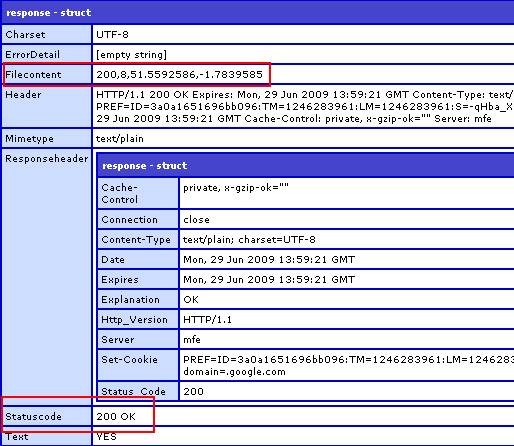
The result is parsed into a struct and returned to the parent function to be stored. Far less overhead than doing this for every map call.
Please note that this is far more heavily commented for Blog purposes. Now to actually call the service using the lat and long variables stored, but thats another article.


|
Gmail default groups do not sync - Family,Friends,Co-Workers |
||||||||
One 'feature' that I've recently found through getting hands on with the Android operating system is synchronising contacts.
After re arranging all my contacts in Gmail I couldn't figure out why some of them were not syncing. I hadn't noticed that Gmail creates three default Groups for you. 'Family', 'Friends' and 'Coworkers' are all default groups created and managed by Gmail. You cannot delete or rename them, and they will not Sync! In fact they do not even appear in the Android groups listing!
I cannot find any options to change this, so my only recommendation is to create a similarly named group, and move everyone into that. I've created 'Friends.', and that seems to have done the trick.
If anyone knows how to get around this, please share!
|
Wikitude travel guide for Android |
||||||||
I was recently recommended Wikitude by a friend, so I downloaded it off the Android market place, and fired it up. It's a little slow to start, but it's something really special once it does.
It uses a combination of the inbuilt compass and GPS receiver to locate your position and facing, then it searches its content database for points of interest around you.
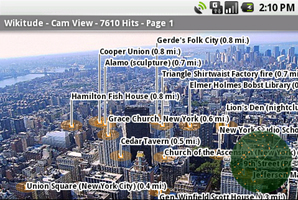
It's pretty cool seeing the technology convergence on a Google map type interface, but once you fire up the 'camera view' then it really comes alive. It overlays the same points of interest onto your camera viewer, giving you information about each as a pop up when clicked on.
Developers' site is here: http://www.mobilizy.com/en/wikitude-ein-reisefuhrer
It's a really impressive integration of technology into real life, which actually has a valid use. On the down side it takes a few seconds to load, and if your GPS setting is off then it's not that accurate, but that's not really a Wikitude issue.
|
IE 8 Https security warning pop up prompt annoyances |
||||||||
With the continue rollout of IE 8 some issues rise to the top of pile in the way the browser interacts with users. I can see 'why' this next issue occurs, but it doesn't handle the user interaction very well at all.
One of the more significant changes is the way that IE handles security exceptions. The message to the user has been changed to be inversed. Usually a user will look for an 'ok' button, but in this instance 'ok' is the wrong answer (see screenshot).
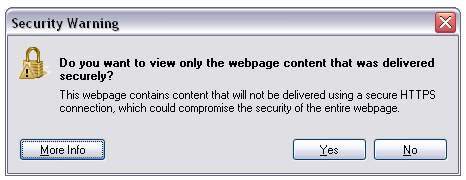
This pop up happens when the site you are on is serving up non https content on an https URL, IE images and style links that are http://url/image.src rather than https://.
The only work around for this seems to be either having a user manually edit their IE settings, like this:
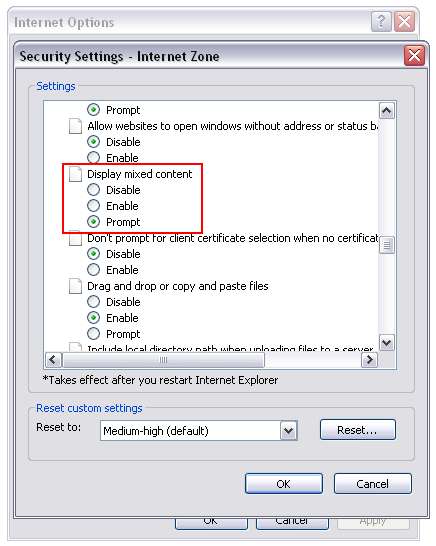
This isn't exactly reasonable though. The other fix is to change all your content to be https. This is potentially a huge code change depending on how your site works.
I was hoping to find an IE 8 compatibility setting to revert this back to the same handling method as IE 7, but that doesn't seem to exist. If anyone has any ideas feel free to comment!


