|
Xbox 360 to get a new controller (Gross green!) |
||||||||
So I was sent a link to the new XBOX 360 controller this morning. Its supposed to have a more sensitive D pad, but that doesn't excuse it from being the most god awful green colour.
Check out a full article at Gizmodo:

http://uk.gizmodo.com/2008/08/21/xbox_360_getting_new_controlle.html


|
Non Selectable options in a drop down |
||||||||
Its been a while since I learned any new HTML, but today I did.
Recently I was creating a list of two separate data sets, a primary list of high level countries, and a secondary list of less prominent countries.
So to separate the data I thought I'd stick an:
But that doesn't work! It still leaves your option as a selectable index.
Instead there is a tag, the 'optgroup' code. It turns out that you can wrap your group of options with this tag, and it inserts an unselectable option into the list!
2 <optgroup label="-------------------">
3 <option value="1">1</option>
4 <option value="2">2</option>
5 <option value="3">3</option>
6 </optgroup>
7 <optgroup label="--------------------">
8 <option value="A">A</option>
9 <option value="B">B</option>
10 <option value="C">C</option>
11 </optgroup>
12</select>
|
ActiveCrossSelect custom tag |
||||||||
In several previous projects I've had cause to be moving data from one list to another. Rather than creating a form, with a list, I'd wanted a more elegant solution, so I 'found' a really handy custom tag that doesn't seem to have had much press.
Its fairly old, but does a great job of creating two text areas, and allowing a user to move data between them.
ActiveCrossSelect is the custom tag. I like it, you will to :-).
I didn't write it, it was written by 'Vitaliy Shevchuk', so all credit there.
View a test script here.
Download the Rar archived version here.
2 left_name = "left_C1"
3 right_name = "Right_C1"
4 valuesleft = ""
5 valuesright = "1,2,3,4,5,6,7,8,9,0"
6 textleft = ""
7 textright = "11,22,33,44,55,66,77,88,99,00"
8 formname="form1"
9 width="250"
10 sizeleft = "7"
11 sizeright = "7"
12 headleft="Left Text 1 "
13 headright="Right Text 1"
14 onChange="alert(oh);"
15 quotedlist = "No"
16 JS = "ActiveCrossSelect.js"
17 >
|
Be careful using URL FlashVars! |
||||||||
A while ago I subscribed to an online magazine. Its a bit laddish, but it has the odd interesting article, and its done in flash/flex.
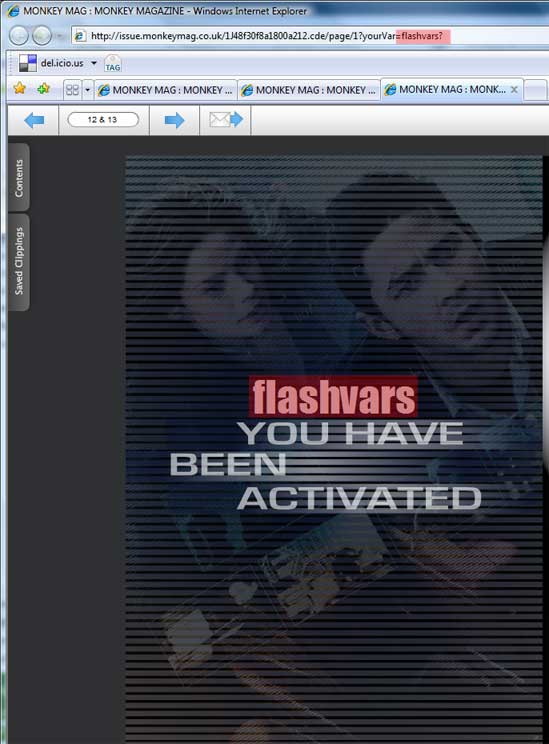
The most recent article arrived in my in-box the other day, and one of the pages was an advert for the new film 'eagle eye' rather unfortunately they had passed in your subscription name value as a flashVar in the URL scope.
This is probably one of the easiest ways to pass variables into flex, but also the most unsecure, and easily changed, as per the screen shot below. Luckily in this case it was just a display variable, but what about if this was a query param? or a value for a piece of data being sent back to a server?
There are many other ways of passing variables into flex apps, I'd go for using a properties file. Have your flex look for a server side XML definitions file on "creationComplete". Or edit your Embed/Object code, whilst still not ideal its far better than a url variable!
The magazine:
http://www.monkeymag.co.uk/